GetResponse vs AWeber: Which Email Platform Fits Your Plan
 OSI Affiliate Reviews DeskEditorial team
Both products send email to a list you own, and both now include landing pages, automation and payment-connected forms. Choose the paid tier that contains the job you need, then check how your bill behaves as list size and send volume move.
For a 1,000-contact weekly newsletter with one welcome sequence, GetResponse Starter is the lower-cost documented match at $19 per month, with unlimited paid sends under its terms. If you need three simple workflows or phone support at that same size, AWeber Lite or Plus may fit better. At 500 paid contacts, the direction flips: AWeber Lite at $15 per month undercuts GetResponse Starter’s $19 minimum contact band.
Our separate GetResponse review and AWeber review go deeper on each product alone.
Both include a list with forms and landing pages, an email builder, autoresponders and behavior-triggered workflows, broadcast split testing, payment-connected forms, import and export paths, and Zapier-style integrations. The differences sit in plan gates: workflow counts and elements, which tier unlocks behavioral automation, branding, send caps and billable-contact rules.

OSI Affiliate conceptual illustration of two equal email workstations and a cost ledger. It is not a real product interface.
Where the plans actually divide
| Criterion | GetResponse | AWeber | What it changes |
|---|---|---|---|
| Workflow count and gate | Starter: 1 workflow, ≤6 elements; tags, scoring, course and ecommerce elements excluded. Marketer: unlimited workflows. | Lite: 3 automations; behavioral automation excluded. Plus: unlimited workflows. | Lite is the count floor for three simple sequences. Plus is the documented paid floor for a required behavioral workflow. |
| Behavioral branching | Condition-based routing available; Starter can fit a rule only if it stays within one workflow, ≤6 elements and avoids excluded elements. | Current Workflows include a Yes/No Split Path on opens, clicks and tags. | Both can branch. The check is exact condition-to-tier mapping, not whether one product lacks branching. |
| Broadcast A/B testing | Marketer and Creator only; not Starter. | Lite and Plus. | AWeber places broadcast A/B in its base paid plans; GetResponse gates it higher. |
| Workflow-path testing | Native percentage Splitter with random allocation and manual analysis. | Copied, tag-triggered workflow test with manual or form-based allocation and manual winner selection. | Different mechanisms, not “AWeber cannot test workflows.” |
| Landing pages | Unlimited on paid Starter and above. | Lite: 3 pages; Plus: unlimited. | GetResponse has a count edge versus Lite and a count tie versus Plus. |
| Users or seats | Starter: 3; Marketer and Creator: 5. | Lite: 3 users; Plus: unlimited users. | Similar at entry; Plus lifts the cap. |
| Send cap | Unlimited paid sends under terms; list-extension fees can apply to billable contacts. | 10× Lite / 12× Plus of the purchased subscriber band, then automatic movement to the next tier. | GetResponse’s unlimited sending sits beside contact overage fees; AWeber overage moves the tier. |
| Billable states | Current-month per-list copies; stored, added, unsubscribed, deleted, rejected, unconfirmed and inactive records can affect the count. | Unsubscribes excluded; cross-list duplicate and unconfirmed billing unresolved. | Verify actual billable counts before comparing invoices. |
| Phone support | Self-service plans: email/chat; phone Enterprise. | Paid plans: phone Mon–Fri 8 a.m.–8 p.m. ET; email/chat 24/7. | AWeber has a documented self-service phone channel. Quality and response time were not measured. |
| Webinar and course route | Creator documents a 100-attendee host and courses. | The inspected official route uses external webinar tools and connectors with separate fees. | GetResponse Creator is the verified included route. An AWeber equivalent total requires a quote. |
| Migration | Custom migration after survey or discovery; price unknown. | Advertised free migration with a defined scope; eligibility must be confirmed. | Both offer help; neither promise equals a completed test. |
Real plan costs at useful list sizes
Prices below are regular USD before applicable taxes, checked 16 October 2026 for US self-service new accounts. AWeber annual figures are exact published annual totals. GetResponse annual figures are calculated estimates from the displayed monthly equivalent, not confirmed checkout invoices. An annual commitment is a different payment decision with its own cash total.
| Billable count assumed for each estimate | GetResponse Starter monthly / calculated annual estimate | GetResponse Marketer monthly / calculated annual estimate | GetResponse Creator monthly / calculated annual estimate | AWeber Lite monthly / exact annual | AWeber Plus monthly / exact annual |
|---|---|---|---|---|---|
| 500 billable contacts | $19 / $186.96 (1,000 minimum band) | $59 / $580.56 (1,000 band) | $69 / $678.96 (1,000 band) | $15 / $150 | $30 / $240 |
| 1,000 | $19 / $186.96 | $59 / $580.56 | $69 / $678.96 | $25 / $250 | $45 / $450 |
| 2,500 | $29 / $285.36 | $69 / $678.96 | $79 / $777.36 | $35 / $350 | $55 / $550 |
| 5,000 | $54 / $531.36 | $95 / $934.80 | $109 / $1,072.56 | $60 / $600 | $90 / $900 |
The table excludes tax, add-on purchases, payment-processor fees, usage overages and temporary promotions. For a 1,000-contact annual commitment, GetResponse Starter’s calculated estimate is $186.96, while AWeber Lite’s exact published annual total is $250, an estimated $63.04 difference before tax for the simple-newsletter job. Do not multiply AWeber’s rounded monthly amounts, and do not treat GetResponse’s displayed monthly equivalent as a verified annual invoice. Current official numbers live on the GetResponse pricing page and the AWeber pricing page.
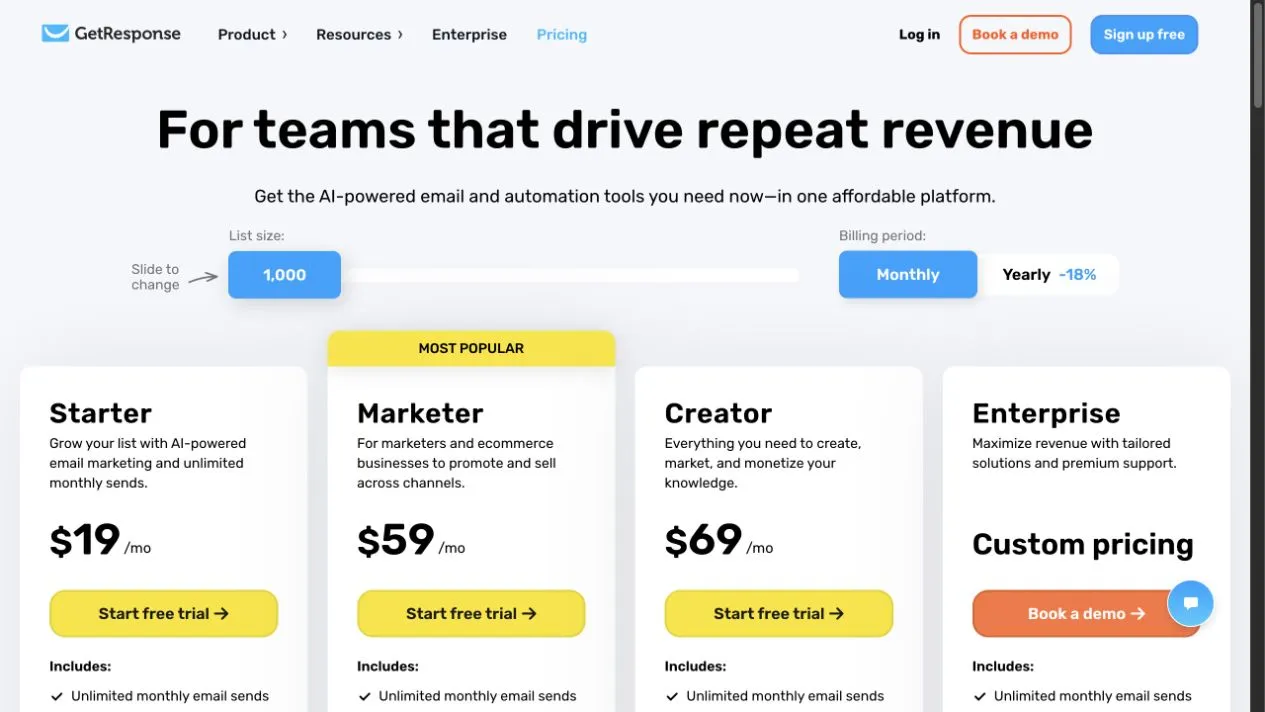
GetResponse public pricing page captured 16 October 2026, showing Starter $19, Marketer $59 and Creator $69 at 1,000 contacts on monthly billing. This is a public page capture, not an account checkout.
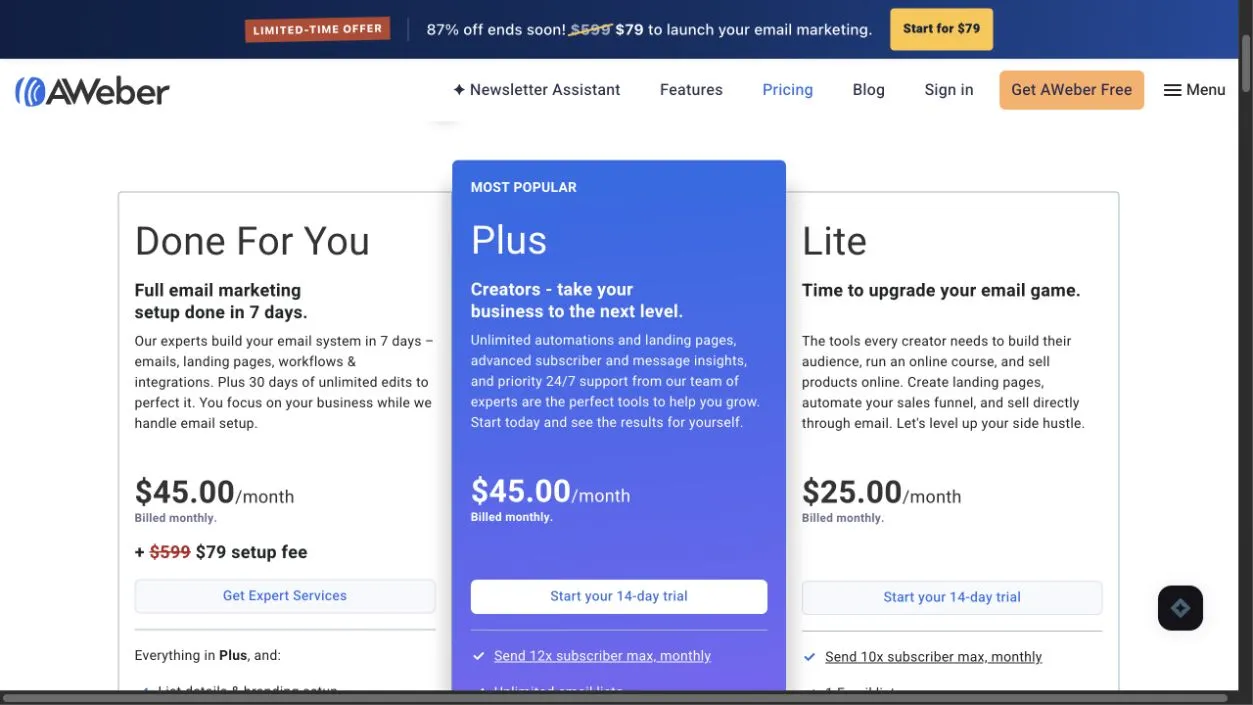
AWeber public pricing page captured 16 October 2026, showing Lite $25 and Plus $45 at the 501–1,000 subscriber band on monthly billing; Done For You appears as a separate service. This is a public page capture.
Worked cases that change the cheap answer
Basic 1,000-contact monthly newsletter. GetResponse Starter at $19 per month is $6 less than AWeber Lite at $25, and Starter also includes unlimited paid sends and unlimited paid landing pages. That is a plan-and-capacity edge for this specific job, not a platform-wide value verdict. AWeber Lite’s paid broadcast A/B testing and phone support may justify the higher price for some buyers.
Three small workflows at 1,000 contacts. AWeber Lite documents 3 automations at $25 per month. GetResponse Starter documents one workflow with a six-element ceiling. If you need exactly three simple sequences and each condition is eligible on Lite, AWeber wins on count and sticker price. If you need unlimited workflows, AWeber Plus at $45 per month is $14 lower than GetResponse Marketer at $59, but those bundles are not identical.
Creator-style business at 1,000 contacts. GetResponse Creator starts at $69 per month and is the route we verified for included courses and a 100-attendee hosted webinar. AWeber’s inspected official route points to external webinar tools and connectors, at quoted prices we could not capture. Do not assume the lower AWeber plan price makes webinars cheaper without pricing the full external route.
Compare the plan that includes your required capability, not the cheapest plan that shares a brand name.
Free and trial routes are not the same as paid plans
Both products keep an ongoing free route for up to 500 contacts, with different limits.
GetResponse Free continues after a 14-day premium period. It supports up to 500 contacts and 2,500 newsletter sends per month with one published page. After that period, you cannot publish email automations or autoresponders, and premium scheduling is unavailable. A free account does not prove what a paid Starter workflow can do. See the GetResponse free-trial help.
AWeber Free is a separate lifetime free account with up to 500 subscribers, 3,000 sends per month, one list and one workflow. The exact behavioral-condition gate on Free is not documented in the pages we inspected. Do not assume a Split Path branch will publish on Free without checking. See the AWeber plan help.
Both vendors’ paid-pricing pages advertise 14-day paid-plan trials. A trial exposes an interface for a limited time, not the billable entitlements of a chosen subscription. A four-newsletter month at 500 contacts is 2,000 sends before welcome or other messages, which fits inside both free send caps in those months. Not every month has four issues.
Automation and email testing: plan gates matter more than labels
AWeber can branch. Its current Workflows documentation includes a Split Path with Yes/No conditions based on opens, clicks and tags, with actions on both branches.
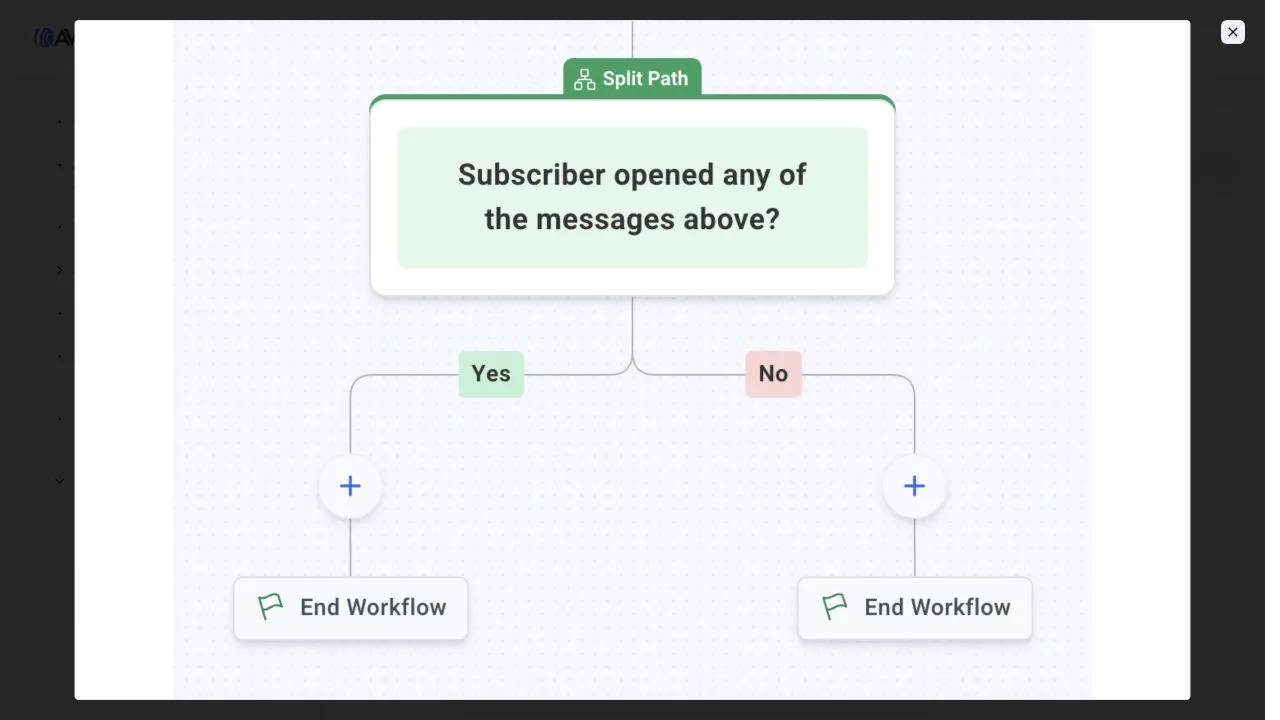
AWeber’s official Workflows documentation, captured 16 October 2026, showing a vendor-authored Yes/No Split Path example based on an email open. OSI did not run this workflow.
That does not make the two builders equivalent. GetResponse also supports condition-based routing, and its percentage Splitter is a distinct random experiment mechanism, not a substitute for a Yes/No behavioral condition.
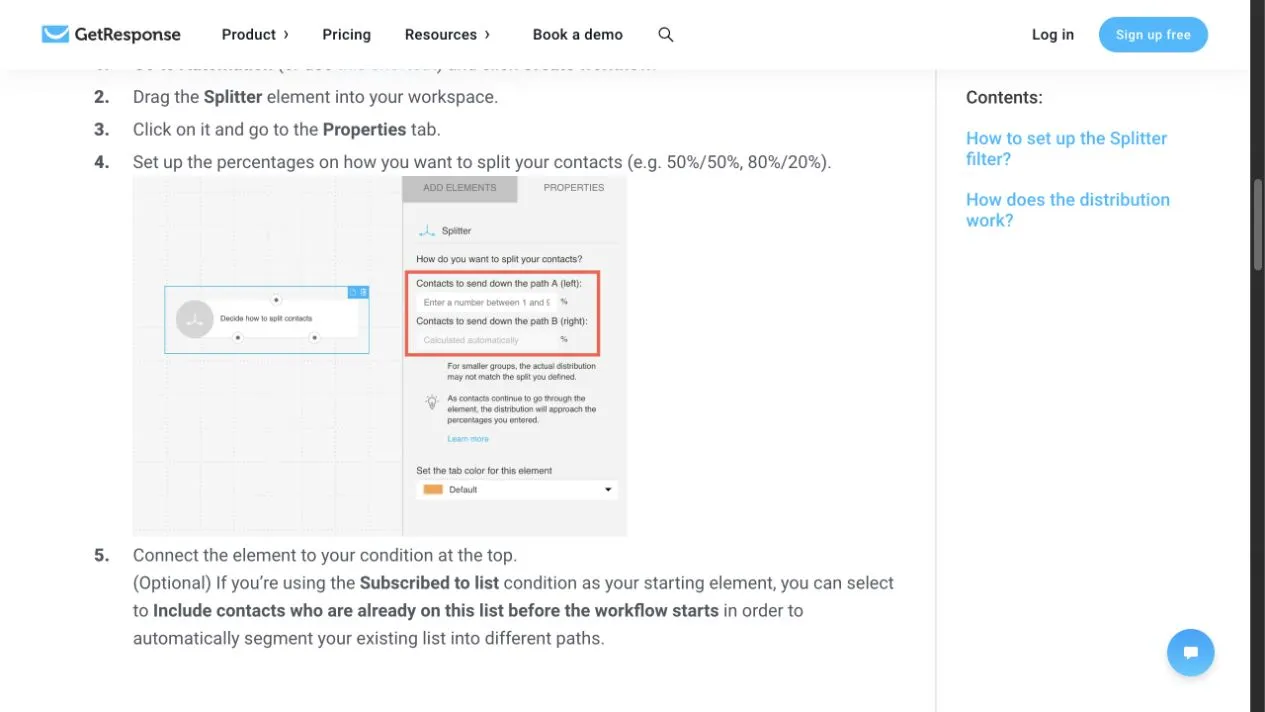
GetResponse official help page, captured 16 October 2026, showing the percentage Splitter settings for random allocation. This is a documented mechanism from a public page, not a workflow OSI executed.
What the tier gates actually allow
GetResponse Starter documents one workflow with a maximum of six elements, and excludes tags, scoring, course and ecommerce elements inside that workflow. Element count is not email count. Six elements may be enough for a short welcome sequence, but it is a tight budget. Starter can run a behavioral rule only if the rule stays within those boundaries; it does not prove every condition is unavailable. GetResponse Marketer moves to unlimited workflows but still lacks course and webinar elements. Creator adds those. See the GetResponse workflow plan help.
AWeber Lite documents 3 automations, but the pricing card visibly marks behavioral automation as excluded from Lite. Treat AWeber Plus as the minimum documented paid plan for a required behavioral Split Path, and confirm the exact condition-to-tier mapping before purchase. Plus lifts the workflow cap to unlimited. AWeber also documents a 500-step per-workflow ceiling; that is a different limit from GetResponse Starter’s six-element ceiling, and neither number measures how well a builder handles real-world logic. See the AWeber Split Path help and workflow steps page.
A concrete rule to reproduce before paying
Suppose you want: a new subscriber receives a welcome email; if they click a link inside it, send a product guide; if they do not click, wait three days and send a short reintroduction.
Both platforms can express versions of this rule, but the eligible tier differs. Reproduce the exact rule in the trial that matches your likely plan. GetResponse Starter may support it if the rule fits one workflow, six elements, and avoids the excluded tags, scoring, course and ecommerce elements. GetResponse Marketer is needed when workflow quantity, more than six elements, tagging or scoring rules Starter out. AWeber Plus is the route to test a behavioral Split Path; do not use Lite as that test bed. Confirm publishing conditions before assuming the draft will run on the paid plan. Both products have a branching route at an appropriate eligible plan.
Broadcast A/B versus workflow testing
- Broadcast A/B testing splits a one-time campaign. GetResponse includes it on Marketer and Creator, not Starter. AWeber documents a two-variant test with a reserve group and manual winner selection on Lite and Plus. See the AWeber split-test page.
- Workflow testing compares two entire paths. GetResponse’s percentage Splitter randomly allocates contacts and requires manual analysis. AWeber’s documented workflow-test route copies a workflow, applies a distinct trigger tag, directs contacts into versions manually or through forms, then reviews stats and selects a winner by hand. See the GetResponse Splitter page and AWeber workflow-test page.
The pages we inspected describe manual analysis and manual winner selection. They do not describe automated statistical significance or an automatic winner.
Pages, creator bundle, support and the tools you already pay for
GetResponse paid plans include unlimited landing pages, with 3 users on Starter and 5 on Marketer and Creator. AWeber Lite includes 3 pages, 3 users, 1 list and 1 custom segment; Plus removes those caps. A buyer running one list and one page may not notice Lite’s caps; multiple lead magnets push toward Plus.
AWeber Lite keeps an email badge, and its pricing card visibly crosses out branding removal. Removal is a Plus-only gate for the email badge. Do not generalize that gate to every AWeber receipt, form or order surface.
GetResponse Creator documents an included 100-attendee hosted room and an integrated course builder, with US lower-tier add-on availability still unconfirmed. AWeber’s inspected official route shows external webinar tools and a Zoom registration route through Zapier; that inspected route does not prove product-wide absence of a native host, but the external host and connector fees are unpriced without a quote. If you need a verified included route, GetResponse Creator is the supported choice. An existing AWeber customer should obtain a current quote for the external route before assuming total cost. See the GetResponse webinar page and AWeber webinar integrations page.
Compare support channels and hours. AWeber lists phone support Monday–Friday 8 a.m.–8 p.m. Eastern and email/chat channels. GetResponse lists email and chat on self-service plans and phone support only on Enterprise. A phone line is a real edge for buyers who want voice contact. It says nothing about response time or agent knowledge. See the AWeber business-hours page and GetResponse plan page.
Before paying extra for an all-in-one bundle, inventory what you already own. If you already pay for a site builder, funnel tool, course host or webinar platform, GetResponse’s broader Creator package may duplicate those tools or push you into a higher tier to unlock one missing feature. That is an operating-cost question, not a statement about feature quality.
Billing states and send caps: where the invoice forms
GetResponse’s current billing help and US terms count per-list copies and a current-month set of stored, added, unsubscribed, deleted, rejected, unconfirmed and inactive records. A contact in two lists counts twice, and a contact removed this month may still affect that month’s count. Check the GetResponse billing page and US terms before assuming the plan price equals your bill.
AWeber explicitly excludes unsubscribed records from billing, according to its current help. AWeber’s documentation also says a reduced count does not automatically downgrade your tier; you request a change through support. Do not delete suppression or consent history just to lower a count. The pages we inspected do not resolve whether duplicate addresses across multiple lists or unconfirmed records share that billing treatment; verify that directly before assuming the invoice. See the AWeber unsubscribe help, downgrade help and deduplication help.
GetResponse paid plans include unlimited sends under their terms, but the list-extension fee can appear monthly even on an annual plan if billable contacts exceed the purchased band. “Unlimited sends” is not “unlimited free contact capacity.”
AWeber paid plans cap sends at 10× the purchased subscriber-tier capacity on Lite and 12× on Plus, then automatically move the account to the next subscriber tier. The cap is measured against the tier’s maximum contact band, not your exact active count. A 1,000-contact Lite plan has a 10,000-send allowance whether your actual list is 700 or 1,000. A 30,000-message month at that band would exceed the allowance; AWeber is not unable to send more, but you pay for the larger tier. Daily broadcasts plus welcome and re-engagement mail approach the cap faster. Price the next tier when your send pattern threatens it. See the AWeber send-limits help.
Migrating between platforms without losing your list
Both vendors document migration services, but neither result was tested here. AWeber advertises free expert migration covering lists, tags, subscribers, up to 3 templates, forms and pages, and automations; account eligibility and exact mapping must be confirmed. GetResponse offers custom migration after a survey or discovery call, and we could not quote a total. See the AWeber migration page and GetResponse migration page.
Before closing an old account, run the checks that reduce silent failures: export a sample CSV and inspect how custom fields and statuses map; preserve suppression and consent records; avoid triggering a second welcome email during import; validate forms, payments and any external webinar route; and compare the final quote to your own billable-count estimate. A working incumbent platform is not automatically wrong. Stay put when the current system still meets your needs and the saved cost or required capability does not outweigh rebuilding, testing and retraining. Our email platform migration guide walks through the full sequence.
The plan-and-send cap checker and pilot worksheet
Because both platforms mix list-size pricing, plan gates, send allowances and billable-count rules, we built a plan-and-send cap checker.
Choose plans manually; the checker will not declare a cheapest eligible winner or silently upgrade you. Enter each vendor’s own billable count, but use one shared monthly forecast for broadcasts plus automation sends. Select monthly or annual basis, then add any whole-account quotes, extras or setup costs. Entered quotes change the displayed cost, not the plan entitlements, and they never remove requirement warnings.
Outputs keep cost estimates separate from send headroom and requirement warnings. Public presets stop at 5,000 contacts; beyond that, get a quote and confirm capacity. GetResponse annual figures are labeled derived estimates; AWeber annual figures are exact published totals. The first-year figure adds setup plus 12 months of extras, while later years omit setup. Unentered tax, usage, processor and external webinar fees are excluded, along with future price changes.
An AWeber send overage warning means the displayed base is not your full forecast cost. Calculations stay in your browser, the CSV exports your assumptions and estimates, and the worksheet leaves blank pilot observations blank.
Use the pilot worksheet beside the checker to reproduce one welcome or branch rule on each eligible tier, confirm the condition names and publishing gate, total a normal month’s broadcast plus automation sends, inspect a sample CSV import, preserve suppression and consent records, check forms, payments and external webinar connections, and compare the quote to your own billable-count estimate.
Open the plan-and-send cap checker · Download the pilot worksheet CSV
What would these plans cost for your list?
Compare paid plans using separate billable counts, your send forecast and the requirements below. Start with the article’s plan table; the cheapest price does not establish that a plan fits.
GetResponse
- Selected capacity preset
- First year: base + entered costs
- Later year, same entered costs
- Monthly email allowance
AWeber
- Selected capacity preset
- First year: base + entered costs
- Later year, same entered costs
- Monthly email allowance
US regular public prices and scoped limits checked 16 October 2026. GetResponse annual bases are calculated from displayed monthly equivalents; AWeber annual bases use published annual totals. First year adds monthly extras ×12 and setup; later year omits setup. Taxes, unentered usage/transaction/processor fees, services and renewal changes are excluded. Entries stay in this browser; downloads contain your assumptions and blank pilot results, not completed product tests.
Which buyer should pick which platform
Newsletter and low-volume senders. At 500 paid contacts, AWeber Lite at $15 per month is lower. At 1,000 contacts with one welcome sequence and weekly broadcasts, GetResponse Starter at $19 per month costs less and includes more send headroom and unlimited pages. If paid phone support and broadcast A/B testing matter more, AWeber Lite may justify the higher price.
Behavioral-workflow and A/B-testing buyers. AWeber Plus at $45 per month and GetResponse Marketer at $59 per month are documented paid routes to compare. Marketer is also the required tier when tagging, scoring, more-than-six-element workflows or workflow quantity rules Starter out. GetResponse Marketer adds native percentage splitting; AWeber Plus keeps phone support. Lite is not the behavioral-workflow match.
Creators requiring a verified hosted webinar or course route. GetResponse Creator from $69 per month at 1,000 contacts is the documented included route. If you are on AWeber, quote the external host and connector before assuming the total cost is lower.
Current customers considering a switch. Switch for a concrete saved cost or a required capability the current platform cannot provide, not because a comparison page changed. If the incumbent still does the job, staying put is a valid ending. If neither set of eligible plans supports your actual rule, integration or budget, expand the shortlist: read our ActiveCampaign review for a different automation-focused product, or the best email marketing platforms page.
Method, limitations and commercial disclosure
Author and evidence model. This article was written and edited by OSI Affiliate, an independent editorial publication that helps small-business buyers choose software. We researched current official vendor pricing pages, help documentation and plan descriptions and compared them through a buyer-specific framework. We did not run paid accounts, send campaigns, import lists, contact support or measure deliverability. Public page captures and screenshots are dated; they show what the vendor published, not what OSI performed. The method detail lives on our How We Pick page.
Evidence boundaries. Prices, plan gates and documented features are current to 16 October 2026 for US self-service new accounts in USD before tax. Unresolved points worth confirming before purchase include AWeber Free behavioral-condition gates, AWeber duplicate and unconfirmed billing definitions, GetResponse lower-tier webinar add-on availability from a US account, custom migration pricing and external webinar totals. We excluded those points from recommendations rather than guessing. Exact prices and tier gates change; recheck the current pricing pages before paying.
Commercial disclosure. OSI Affiliate may earn a commission when a reader follows an affiliate link and purchases a product. Inclusion, order, caveats and verdicts are never purchased. The same evidence rules apply whether or not a product has an affiliate program. No vendor buys inclusion, order, a favorable verdict or prepublication approval. Full commercial relationships are disclosed on our Disclosure page.
Correction path. If a claim above is now wrong, contact us through the About page with the current source, and we will update the affected passage and revision date after verification.
Next step. Run the plan-and-send cap checker with your current contact count and send estimate. Then reproduce one branch rule inside the trial tier that matches your likely paid plan. Pay only after you confirm the eligible condition, the billable count and the send headroom for the band you will actually occupy.

Written by
OSI Affiliate Reviews DeskEditorial team
Business-software reviews, comparisons and buying guides for small teams. We compare vendor documentation and pricing, explain the limits of our evidence, and identify affiliate links. Each guide states whether it includes account testing, public demos or documentation research.