Jobber vs ServiceTitan: When Does a Small Contractor Need More?
 OSI Affiliate Reviews DeskEditorial team
This comparison usually starts after a normal week gets too long: the owner is still building quotes between jobs, someone is re-entering invoices for the bookkeeper, and a request for a report turns into an afternoon of spreadsheet surgery. At that point, Jobber versus ServiceTitan stops being a feature-list question and starts being about how work actually moves through your office.
Choose Jobber when the office work still fits in the owner’s head and a published Core-to-Grow bundle covers the workflows you’ll actually use. Choose ServiceTitan when the back office has become its own operation — dispatch, commissions, memberships, and reporting — and you’re ready to run a scoped demo before pricing the full configuration.
Don’t make this a technician count. Jobber’s Grow plan includes job costing, custom automations, and two-way SMS, so the old “Jobber is too thin” objection doesn’t survive a look at the current tiers. ServiceTitan’s Starter tier deliberately leaves out mobile estimates, payroll, advanced reporting, commissions, and memberships. What matters is which features you’d actually own at the tier you can buy, and whether you can price the whole configuration.
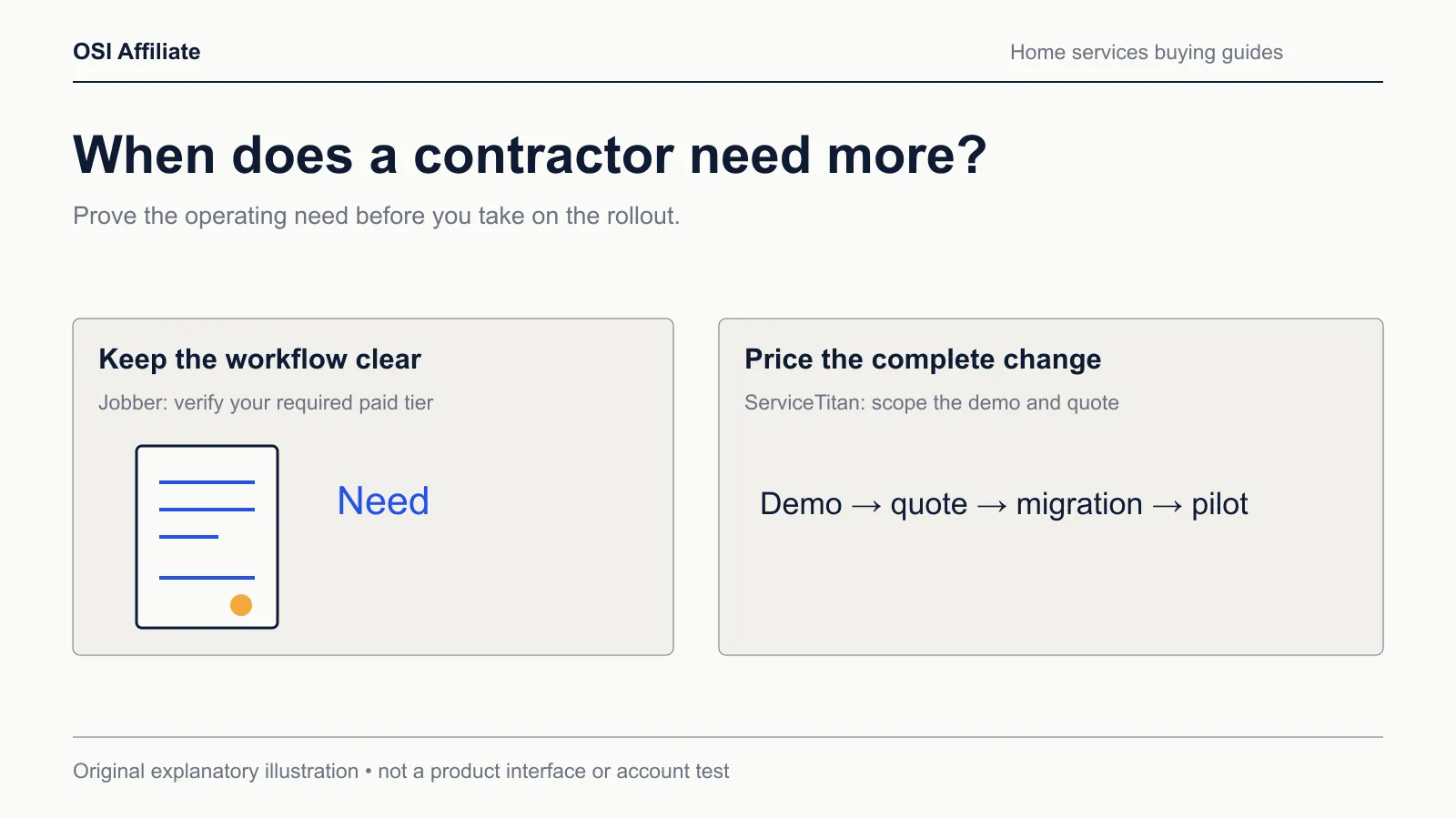
The practical split, not the marketing split
Both products schedule jobs, manage customers, build quotes, send invoices, and take payments. The difference is how much surrounding office machinery each one carries — and how much of that machinery still ends up on your desk either way.
| Decision factor | Jobber (published US pages, Oct 18, 2026) | ServiceTitan (published US pages, Oct 18, 2026) |
|---|---|---|
| Price shape | Published plans; Core starts at $49/mo no commitment for 1 user | Per-technician custom quote across Starter, Essentials, or The Works |
| First-year example, 1 user | Core $588 no commitment; $348 estimated prepaid equivalent | Quote required |
| Job costing | Included on Grow, not Core or Connect | The exact tier gate needs confirmation |
| Reporting | Reporting tools are listed with the platform; direct parity with ServiceTitan’s “advanced” tier wasn’t verified | Advanced reporting excluded from Starter and Essentials; included in The Works |
| QuickBooks connector | QuickBooks Online; the new connection syncs one way from Jobber into QuickBooks | Names QuickBooks Online and Desktop; record-level details need confirmation |
| Implementation | No published onboarding price on the page we captured; 14-day trial runs on Grow | Demo-led; rollout time and fees are quote-specific |
The loose cells on the ServiceTitan side are the honest state of public information. That isn’t a criticism by itself — it means you can’t settle this purchase at your kitchen table. Jobber’s price is visible enough to compare today; ServiceTitan’s total requires a written quote.
Don’t pick by technician count
A tempting mistake with this comparison is to use team size as the filter. That produces a tidy story — Jobber for small shops, ServiceTitan for twenty-plus techs — and the story falls apart when you look at what each tier actually includes.
A four-person firm with a full-time dispatcher, sales commissions, and recurring membership income has ServiceTitan-shaped problems. A dozen-person firm whose owner still handles the schedule, and whose bookkeeper just wants invoices to land in QuickBooks without retyping them, has Jobber-shaped problems.
Judge the decision on these five questions instead:
- Who owns the schedule? If it’s you, between jobs, Jobber’s calendar may be enough. If a dedicated dispatcher is juggling skill matching, capacity planning, and multiple job types, ServiceTitan’s dispatch board is built for that role. Jobber has its own dispatch and scheduling tools, so the buying difference isn’t existence — it’s whether the demonstrated workflow covers your requirements.
- Which reports do you actually open? If you want “what did we bill and what’s outstanding,” both platforms have reporting around that. If you need advanced reporting, commission tracking, or membership performance broken out, ServiceTitan puts those in The Works — two tiers above Starter, not in the entry plan.
- Do you need mobile estimates and payroll in the field? ServiceTitan keeps those out of Starter. If you pick the entry tier to control cost, you may have bought a package that can’t do the thing that motivated the switch.
- Is your accounting QuickBooks Online or Desktop? Jobber’s documented ongoing connector is QuickBooks Online, and the new integration moves records one way from Jobber into QuickBooks. ServiceTitan names both Online and Desktop, but the record-level detail is demo territory, not something to assume.
- Can you absorb an unquoted first year? Jobber’s subscription cost is published; its payment-processing fees, add-ons, and external accounting are still separate.
Where each product makes you upgrade
Plan gates matter more than headline features, because they decide whether the thing you wanted is in the box or behind another tier.
Jobber’s Core, Connect, and Grow
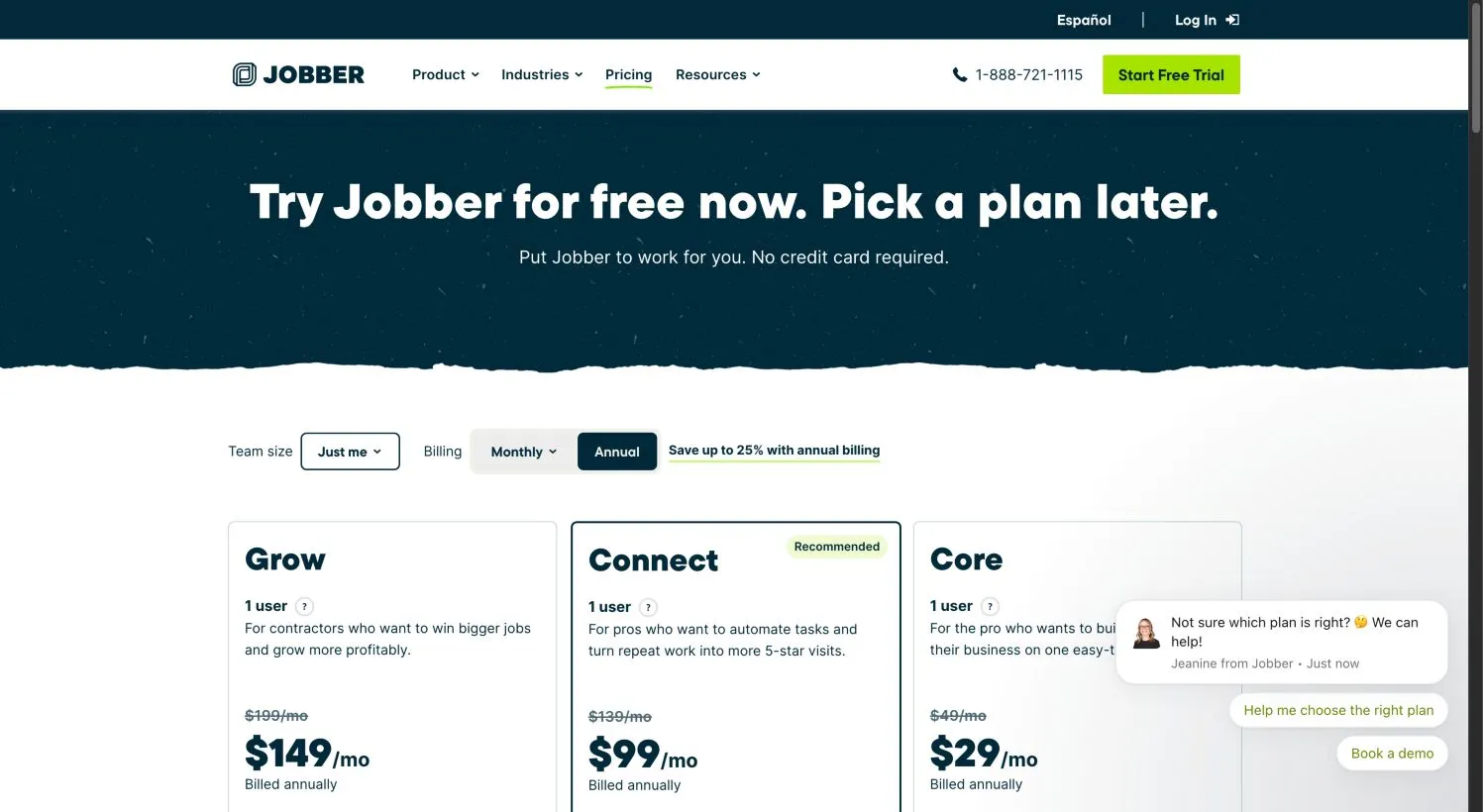
Jobber’s public US pricing page, captured October 18, 2026, lists Core, Connect, and Grow, with Connect and Grow offering bundled user counts of 1, 5, 10, or 15. Core includes quotes, scheduling, invoices, online payment, and online booking. Connect adds automated quote and invoice follow-ups, reminders, checklists, QuickBooks Online, and time-and-expense tracking. Grow adds job costing, two-way SMS, richer quotes, and custom workflow automation.
The takeaway: the old objection that “Jobber is too thin for costing” only applies to Core and Connect. Grow carries job costing. And because the 14-day trial runs on Grow, a trial can feel richer than the Core plan you’d actually buy afterward.
ServiceTitan’s tiers and the greyed-out features
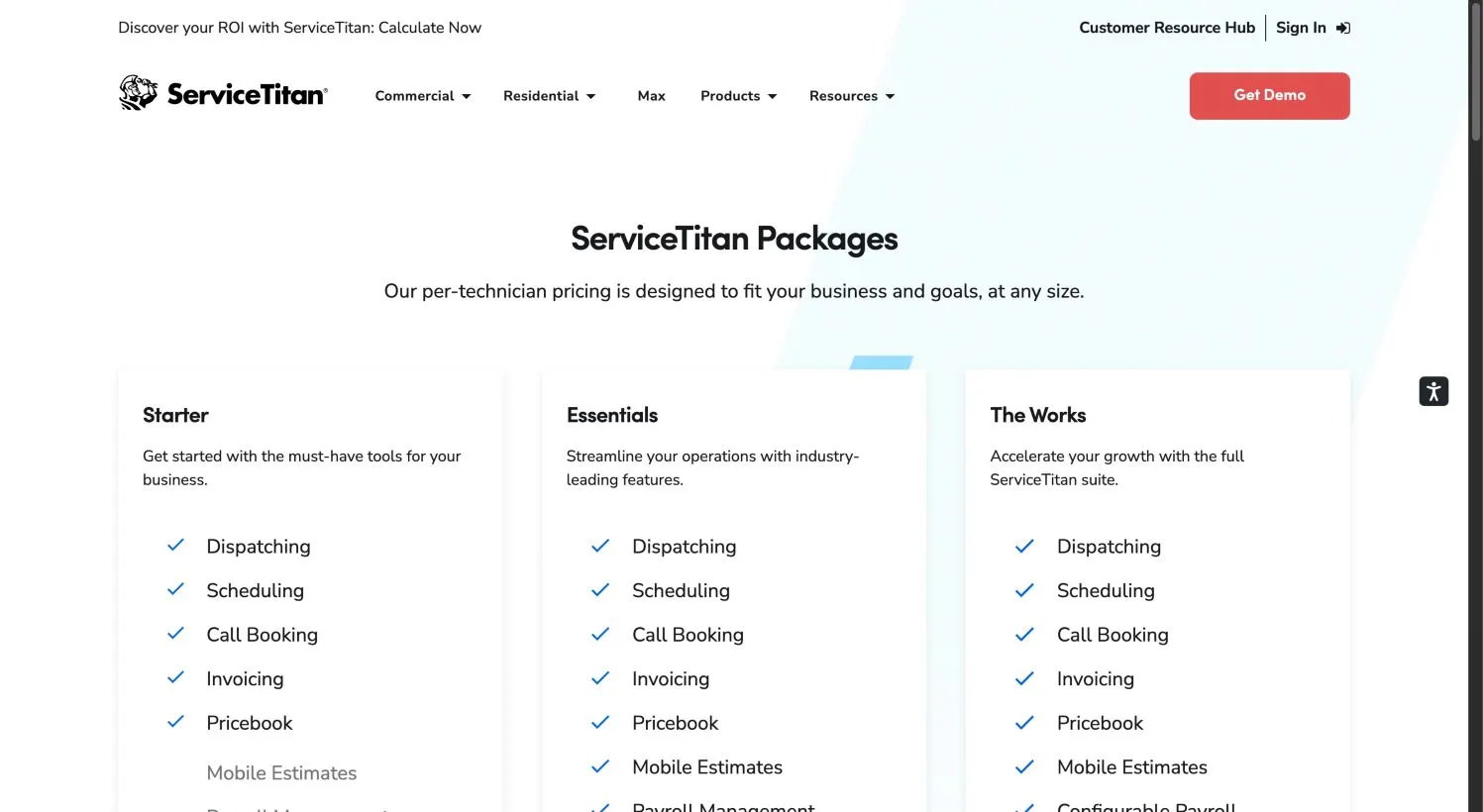
ServiceTitan’s public pricing page — also captured October 18, 2026 — shows Starter, Essentials, and The Works, all priced by request. The page’s visual exclusion marks:
- Starter includes dispatching, scheduling, call booking, invoicing, and pricebook. Mobile estimates, payroll management, advanced reporting, commission tracking, and customizable memberships are shown as excluded.
- Essentials adds mobile estimates and payroll. Advanced reporting, commissions, and memberships remain excluded.
- The Works includes advanced reporting, commission tracking, and customizable memberships.
A cheap ineligible tier can’t win on value, and a stripped-down ServiceTitan entry plan can’t win if the feature you came for lives two tiers up.
Pricing: the known column and the unknown column
Here’s the first-year picture for a small setup, using Jobber’s published US prices and leaving ServiceTitan as a quote, because that’s what it is.
| Configuration | Jobber monthly, no commitment | Jobber estimated annual, prepaid equivalent | ServiceTitan |
|---|---|---|---|
| 1 user, Core | $588/yr | $348/yr (est.) | Quote required |
| 1 user, Connect | $1,668/yr | $1,188/yr (est.) | Quote required |
| 1 user, Grow | $2,388/yr | $1,788/yr (est.) | Quote required |
| 5 users, Grow | $3,588/yr | $2,748/yr (est.) | Quote required |
Jobber’s “billed annually” figures are displayed monthly equivalents; the prepaid total is an estimate, not a checkout invoice. The 12-month commitment billed monthly sits between the no-commitment and prepaid prices. Jobber bundles users, so don’t multiply a single-user rate by team size.
On top of the software subscription, Jobber’s payment processing is a separate fee: online card payments list at 2.9% + 30¢, in-person tap at 2.7% + 30¢, and ACH at 1% on the US page.
The point isn’t “Jobber wins because it’s cheaper.” It’s that Jobber’s cost is visible enough to compare, while ServiceTitan’s total requires a sales conversation and a written quote. For a small contractor deciding this week, that changes the speed and shape of the purchase.
QuickBooks and accounting connectors
This is where generic “both sync with QuickBooks” tables go wrong, because they erase the edition and the direction.
Jobber’s documented connector is QuickBooks Online. Jobber still hosts help pages for a legacy integration — dated April 8, 2026 — but that page carries a banner saying first-time connections use a different new integration. Under the new connector, migration pushes unsynced Jobber changes first, then the ongoing sync is one-way from Jobber into QuickBooks in real time. Once you move, you can’t go back to legacy. The legacy path behaved differently: manually triggered syncs, clients moving both ways, invoices and payments moving one way from Jobber, and timesheets requiring approval plus matching employee and payroll setup.
Don’t treat every QuickBooks feature as one uniform pipeline. The new integration’s field-level behavior — which edits, refunds, taxes, or timestamps move and which don’t — isn’t fully confirmed from the public pages we captured. And if you’re on QuickBooks Desktop, Jobber’s documented ongoing connection isn’t Desktop; the legacy help page’s Desktop client-import reference is not a maintained Desktop integration.
ServiceTitan names QuickBooks Online and QuickBooks Desktop on its accounting integrations page. The exact records, sync directions, and edition or tier gates weren’t verified from public material. In a ServiceTitan demo, ask for a written list of exactly which records sync on your QuickBooks edition and your chosen ServiceTitan tier — not a general assurance that Desktop behaves like Online.
For either product, run a small, supervised sync pilot in an isolated copy of your books before you commit to a month of live accounting. Our QuickBooks sync guide walks through the record-level checks, and the worksheet below gives you a place to record what you observe. If accounting correctness is the thing keeping you awake, the Jobber vs Housecall Pro comparison covers another route with the same caveat about verifying parity rather than trusting a feature-page yes.
The staying-put case
Before you migrate anything, price the switch honestly.
If you’re on Jobber and eyeing ServiceTitan, the cost isn’t only the new quote. It’s rebuilding your pricebook, reconnecting accounting, retraining your office, and living through an implementation whose duration you haven’t been told yet. That may be worth it when advanced reporting, commissions, memberships, or a dedicated dispatch workflow is actively limiting revenue. It’s a poor trade when the real problem is that nobody is filling out the schedule — a new platform won’t fix adoption.
If you’re on ServiceTitan and looking down at Jobber, Jobber’s published rate can make the move look cheaper. Whether it actually saves money depends on the ServiceTitan quote you’d leave and which workflows you’d have to rebuild. Walk your requirements against Jobber’s Grow plan specifically, not against the Core marketing. If you depend on The Works features — advanced reporting, commission tracking, memberships — verify whether Grow reaches the same outcome in the way your office actually uses it. The cost of rebuilding automations and losing a workflow you rely on can swallow the difference.
Migration is a project you plan, not a setting you flip. Put the plan in writing before the cancellation notice goes out.
Your pilot before you pay
The fastest way to stop comparing brochures is to run one workflow through each candidate.
- Create one fictional but realistic customer: name, phone, billing address, and service history.
- Build a quote with at least three line items, one discount or add-on, and your actual pricing.
- Schedule the job to a specific tech, then move it once.
- Mark the work complete, attach a photo or note, and convert the quote to an invoice.
- Record a payment and watch where it lands.
- If accounting matters, trigger the QuickBooks or Desktop sync path and check every record on the other side.
For ServiceTitan, do the equivalent inside the guided demo you can actually get — and write down whether the Starter tier you’re being quoted includes mobile estimates and the reporting you need, or whether you’re being shown The Works and expected to buy it. A demo that shows you the top tier while you’re pricing the bottom tier is a classic source of post-purchase disappointment.
Download the Jobber vs ServiceTitan requirements and migration worksheet and fill in one column per product. It has rows for the five decision questions above, your must-have features, the tier where each one actually appears, your quote line items, and your accounting connector checks. Leave the observation fields blank until you see the result yourself — a blank worksheet is more honest than a guessed one, and it’s the document you’ll want when a sales call tries to skip a tier boundary.
Which one should you choose?
Choose Jobber if your small-team office is still the person in the truck. You need scheduling, quoting, invoicing, and payments, you’re on QuickBooks Online, and the published Core-to-Grow bundle surface covers the workflows you’ll actually use.
Choose ServiceTitan if the back office has become its own operation. Skip it — or at least hold the decision — if you can’t get a written quote that includes implementation, training, and the exact tier you’ll own, or if you’re trying to stay lean this year.
And if neither fits cleanly? A small shop that needs quoting, invoicing, and QuickBooks without ServiceTitan’s weight, but finds Jobber’s plan gates awkward, should start with the field service management shortlist or the free field service software guide to see whether a free-eligible option covers enough to buy you time. For the full category view, our home services software hub links the related comparisons and guides. The worst move is paying for a tier you can’t fully use because it looked better in a table.
How we researched this
OSI Affiliate reviewed current public product pages, pricing pages, help documentation, and public screenshots captured October 18, 2026. We did not open paid accounts, run timed usability trials, execute live imports, benchmark performance, or survey customers. Public screenshots and vendor demo material are labeled as such and are not evidence of logged-in use.
Jobber’s prices and plan boundaries come from its public US pricing page on that date. ServiceTitan’s tier structure and excluded-feature marks come from its public pricing page on that date; its actual subscription price, implementation fee, and rollout duration remain unknown to us. The Jobber new-versus-legacy QuickBooks distinction comes from Jobber’s help documentation, and the record-level behavior of both vendors’ connectors remains partially unverified, as noted above. Read our about page and how we pick page for the fuller method.
Facts, prices, tiers, and integrations change. Verify the subscription, the connector, and the tier boundaries on the vendor’s current page before you commit. If you spot an error, tell us through the site’s correction path.
Affiliate disclosure: OSI Affiliate may earn a commission from qualifying purchases made through links on this page. That commission never determines which products we include, the order we list them, or the verdicts we reach. We apply the same criteria whether or not a vendor pays a commission.

Written by
OSI Affiliate Reviews DeskEditorial team
Business-software reviews, comparisons and buying guides for small teams. We compare vendor documentation and pricing, explain the limits of our evidence, and identify affiliate links. Each guide states whether it includes account testing, public demos or documentation research.