Best Field Service Management Software for Small Business: A Shortlist by Crew Needs
 OSI Affiliate Reviews DeskEditorial team
You're probably choosing field service software at the worst possible time: after a missed reminder, a double-booked Tuesday, or a stack of invoices that should have gone out last week. The expensive mistake is rarely missing a feature. It's choosing a plan shaped for someone else's crew needs, then paying to grow out of it in year two.
Here’s the conditional short answer. Jobber is our pick when quote-to-invoice and follow-up are the daily job. Quotes, scheduling, invoices, online payment and online booking live on the entry paid plan, while the automation you’ll probably want next — automated quote and invoice follow-up, reminders and QuickBooks Online sync — sits one clearly named tier up. Choose FieldVibe when you’re a lean solo operation or small crew that mainly needs scheduling and client records, starting at $0. Choose Housecall Pro when QuickBooks Desktop is a hard requirement and you can work with quote-based pricing. Keep ServiceTitan on the demo list only when your operation already has the dispatch volume, multiple technicians and back-office workload that justify a per-technician quote.
We’ll walk through each path below, including the tier boundary that changes the price. The short version first:
| Product | Best fit | Starting route (October 2026, US, USD) | Decisive limitation |
|---|---|---|---|
| FieldVibe | Solo owner-operator or small crew with a narrow scheduling-and-client job | Solo Free forever, or Solo Pro $20/month for quotes/invoices | Free plan uses manual reminders from your own phone; QuickBooks integration unverified in the pages we inspected |
| Jobber | crews that live on quote-to-invoice and follow-up | Core 1 user $49/month no commitment, or $29/month annual equivalent | Useful QuickBooks Online sync and follow-up automation live in Connect, not Core; new QBO sync is one-way Jobber→QuickBooks |
| Housecall Pro | Dispatch-heavy home services that need a QuickBooks Desktop route | Custom quote; 14-day trial, no card | Pricing is quote-based, so the eligible tier price needs a sales step; QuickBooks subscription is separate |
| ServiceTitan | Only demonstrated dispatch/office complexity with a scoped quote | Per-technician custom quote | Per-technician quote required; Starter excludes payroll, mobile estimates, and advanced reporting |
The criteria that actually change this decision
A field service tool lives or dies on a handful of workflows, not a feature count. We used these five checks for every pick:
- Where does the quote-to-invoice handoff break? The moment you re-type an approved quote into an invoice, or re-type an invoice into QuickBooks, is where the paid tool pays for itself or doesn’t.
- What does “free” actually buy? We compared the permanent free boundary, not the trial. FieldVibe gives you unlimited jobs but manual reminders; Dusk FSM, covered elsewhere, gives you 25 completed work items a month. Those are different constraints.
- Which tier unlocks the connector you need? We traced the exact gate where the vendor publishes it.
- How fast does the price step up? We treated crew size as a scenario, not a cutoff. A five-person crew changes the Jobber math, the FieldVibe plan choice, and whether ServiceTitan even belongs in the conversation.
- What stays behind when you switch? We did not run export tests, and we won’t pretend we did. Where parity is unknown, we flag the pilot check instead of guessing.
There are two tools we deliberately left out of the main shortlist because they solve a different job. Dusk FSM offers a genuinely permanent free route — up to 25 completed work items a month, unlimited staff — and is worth a look if free is the real constraint; our free field service management software guide covers it. Connecteam has a real free plan for up to ten users, but it’s a crew scheduling and time-clock tool, not a quote-to-invoice or receivables system. It belongs in a different comparison.
FieldVibe: the lean pick when scheduling and client records are the whole job
FieldVibe is the pick for a solo owner-operator, or a small crew, whose core problem is knowing who is where and what happened on the last visit. FieldVibe’s own documentation frames it as the opposite of “enterprise clutter”: simple scheduling, client records, reminder texts, quoting, invoicing and a free business website, aimed at pros up to about ten team members.
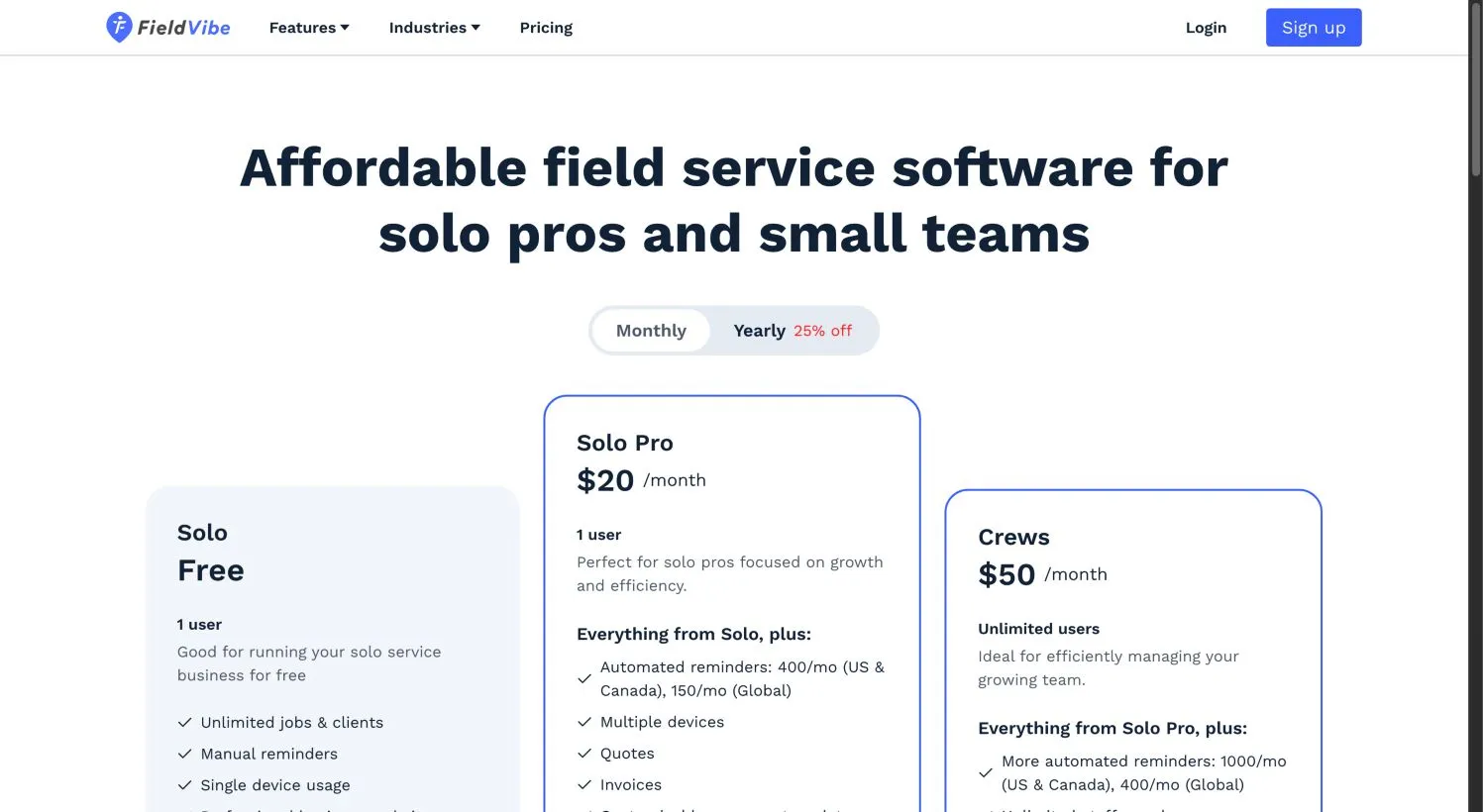
FieldVibe’s pricing page makes the plan boundary unusually clean. Solo is permanently free for one user and includes unlimited jobs and clients, one-time and recurring visit scheduling, a price list, client history, and a business website to capture work requests. The catch is right in the plan name on the vendor page: manual reminders. Free-account reminders are semi-automated messages you send from your own phone, not automated texts from a dedicated number. Solo is also limited to a single device, and it does not include quotes or invoices.
Solo Pro, at $20/month, changes the job boundary: you get quotes, invoices, online payments, time tracking, revenue tracking, multiple devices, and automated reminders — 400 per month in the US and Canada, 150 globally. Crews, at $50/month, keeps everything and adds unlimited staff, roles, permissions, and 1,000 automated reminders monthly in the US and Canada.
Who this fits: a solo cleaning, lawn, handyman or pest operation that needs to stop double-booking and start sending quotes without paying Jobber-level money for automation they’ll use lightly.
Skip FieldVibe if your workflow depends on a verified QuickBooks sync. We found no documented QuickBooks integration in the public pricing and feature pages we inspected. That’s unknown, not proof that none exists — but you should not assume a connector exists just because you’d like one. If QuickBooks is part of the daily close, ask FieldVibe the specific question before paying.
Jobber: our pick when quote-to-invoice is the actual job
Jobber earns this position because the entry paid plan already contains the workflow: quotes, scheduling, invoices, online payment and online booking. Core keeps a one-person shop functional without a sales call, and the plan ladder is explicit enough to price before you commit.
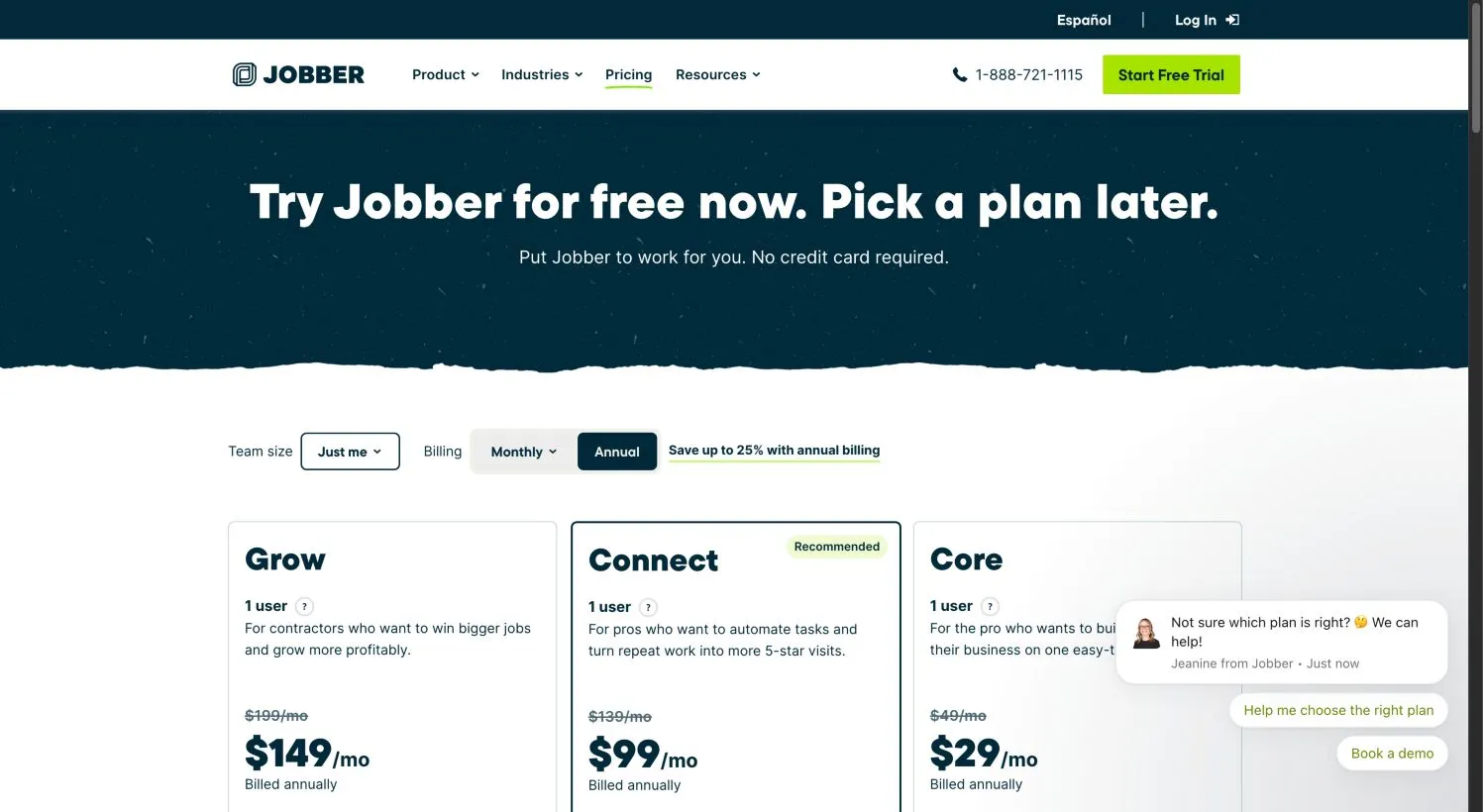
Jobber’s pricing page shows the tier boundary clearly enough to treat as part of the decision. Core, at $49/month for one user with no commitment, or $29/month as a displayed annual equivalent, includes the billing and scheduling core. Connect, at $139/month for one user with no commitment, or $99/month as a displayed annual equivalent, adds automated quote and invoice follow-up, reminders, checklists, QuickBooks Online, and time/expenses tracking. Grow, at $199/month for one user with no commitment, or $149/month as a displayed annual equivalent, adds job costing, two-way SMS, richer quotes and custom workflow automation.
If you already have QuickBooks Online and you’re tired of re-keying invoices, Core will not be the tier you actually want. Price Connect into the decision from day one, not Core. That’s the difference between planning for $49/month and planning for $139/month.
Jobber prices are bundled by user count, not linear per seat. Connect for one user is $139/month; for five users it’s $199/month with no commitment, or $149/month as a displayed annual equivalent. Grow for five users is $299/month with no commitment, or $229/month as a displayed annual equivalent. These are the vendor’s published variants, not a per-seat formula you can extend.
The 14-day Jobber trial gives you full Grow features. That’s useful for testing, and it is also a trap if you forget the difference: the trial is not the Core entitlement you’ll keep after paying. Test whether Grow features matter to you, then place your real workflow in the plan you’ll actually subscribe to.
One more Jobber nuance: payment processing is priced separately from the subscription. The vendor lists card processing around 2.9% + 30¢ for online card payments, 2.7% + 30¢ for tap-to-pay, 1% for bank payments, and an extra 1% for instant payouts. Those percentages move your real cost of getting paid; treat them as separate from the software bill.
You can read our fuller Jobber review for the product’s broader shape. If you’re torn between Jobber and Housecall Pro, the Jobber vs. Housecall Pro comparison resolves the same decision with paired evidence.
Housecall Pro: when QuickBooks Desktop is the non-negotiable
Housecall Pro is the pick when you need dispatch, booking, estimates, invoicing and job costing in one place and — decisively — your accountant runs QuickBooks Desktop. Housecall Pro’s QuickBooks feature page states support for both QuickBooks Online and Desktop, with invoices, customer information, line items and payments pushing automatically into QuickBooks, plus import available.
That Desktop support is the practical reason Housecall Pro enters this shortlist. Jobber’s documented ongoing connector is QuickBooks Online, not Desktop. If your bookkeeper refuses to leave Desktop, Jobber’s current help material points to a legacy Desktop client-import path rather than an ongoing Desktop sync — which is not the same thing as a real-time Desktop integration. Before you build a workflow on Housecall Pro’s Desktop claim, ask the vendor for the exact Desktop version, record types, sync direction, and whether edits made in QuickBooks flow back. A public feature page that says “seamless” does not tell you what happens when you change a price in one system after the invoice has synced.
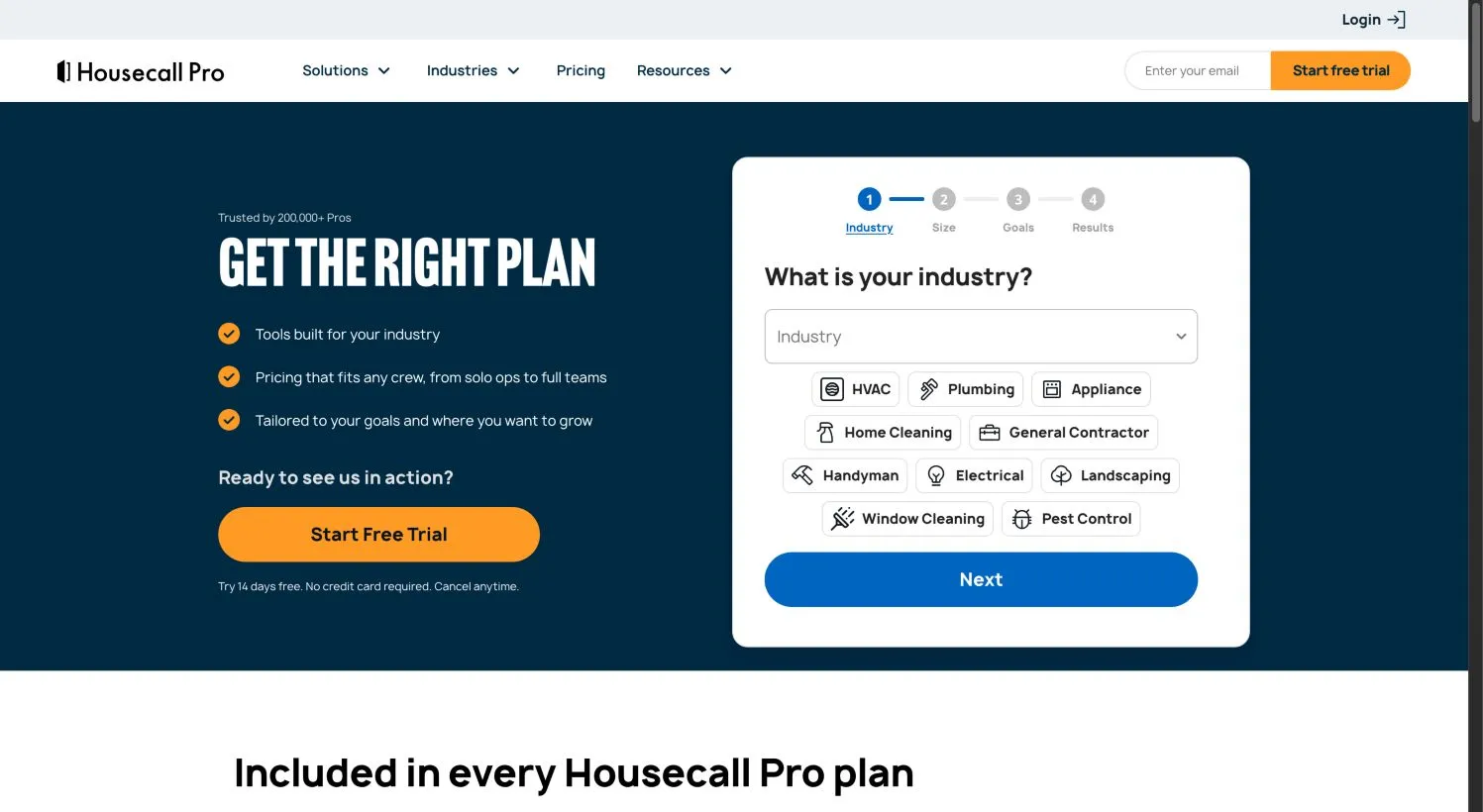
The pricing is the other side of this tradeoff. Housecall Pro’s pricing page presents a tailored quote flow — industry, team size, goals, then a recommended plan — rather than a public price ladder. The page title references a figure “from $59,” but we could not tie that number to a specific eligible plan, team size or billing commitment, so we are not treating it as a plan you can buy. Plan names and rates recycled from older roundups are stale from the evidence we could verify. Treat Housecall Pro as custom-quote pricing and get the number in writing for your team size before you compare it to Jobber.
There’s also a 14-day trial with no card required, which is the part of the Housecall Pro path that is genuinely low-friction. QuickBooks itself is not included in the Housecall Pro subscription, which is standard across this category but worth saying plainly when you’re budgeting.
Skip Housecall Pro if transparent, self-serve pricing matters more than the Desktop route. If you can move the books to QuickBooks Online, Jobber’s published ladder is easier to price and compare without a demo.
ServiceTitan: only after you’ve earned the complexity
ServiceTitan belongs on the list so we can tell you when to rule it out. It’s a per-technician, custom-quoted platform aimed at operations with dispatchers, multiple technicians, capacity planning, and a back office that needs advanced reporting. If that describes you, it may be the right call. If your operation doesn’t have that complexity yet, it’s not the right starting point, and the pricing model is the first signal.
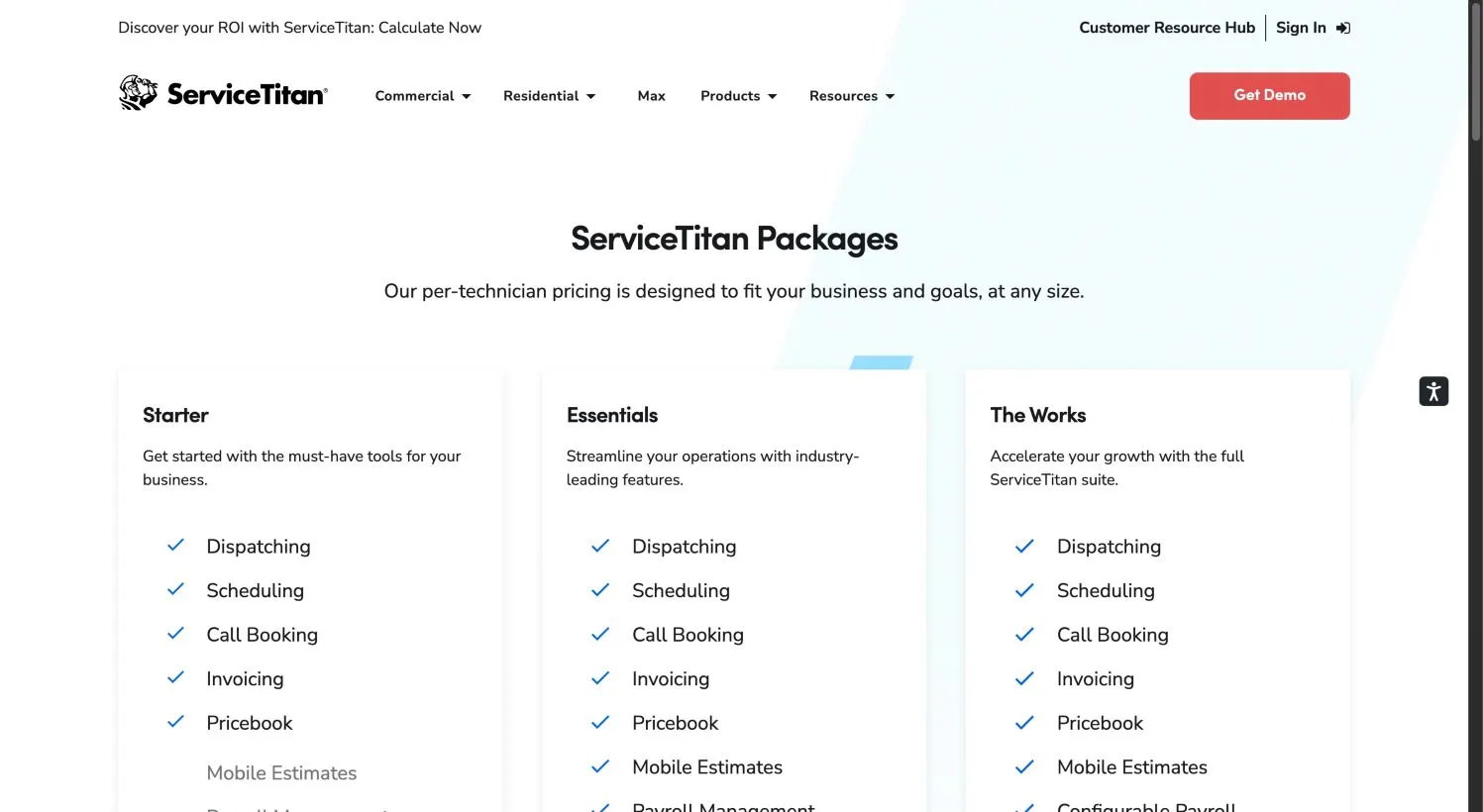
ServiceTitan’s public pricing page shows three packages — Starter, Essentials and The Works — with “Request Pricing” on each. The grayed plan rows matter as much as the visible ones: Starter includes dispatching, scheduling, call booking, invoicing and pricebook, but excludes mobile estimates, payroll management, advanced reporting, commission tracking and customizable memberships. Essentials adds mobile estimates and payroll, but keeps advanced reporting, commissions and memberships excluded. The Works is where the full suite appears. If a vendor demo or older comparison implied ServiceTitan includes payroll and advanced reporting everywhere, the current pricing page disagrees.
Per-technician pricing means the annual number moves with your technician count, and there’s no published monthly rate we could verify. There is also a dispatch-specific feature page confirming the dispatch board is a real part of the platform, but that doesn’t change the buying rule: scope a quote with your technician count and required tier, and insist on which features sit at that tier. Do not let a product tour of The Works anchor your expectations for Starter.
ServiceTitan’s accounting integrations page lists QuickBooks Online and Desktop among many integrations, but we could not verify the exact records, sync directions or edition/plan gates for a small-business account. Treat the connector as a demo question, not an assumption.
Skip ServiceTitan if your operation doesn’t yet need capacity planning, multiple-technician dispatch or advanced reporting. If you’ve reached that point, the Jobber vs. ServiceTitan comparison walks through the harder call.
What this actually costs: like-for-like first-year examples
The table below uses the current published figures we could verify on October 18, 2026, for a US buyer in USD, excluding sales tax and separate payment-processing fees. Where the vendor shows an annual equivalent but not a confirmed checkout total, we’ve labeled the result an estimate. Housecall Pro and ServiceTitan stay “custom quote” because no verified eligible rate exists in the evidence we captured.
| Configuration | Published rate basis | First-year software subscription |
|---|---|---|
| FieldVibe Solo Pro, 1 user | $20/month | $240 |
| FieldVibe Crews, unlimited staff | $50/month | $600 |
| Jobber Core, 1 user, no commitment | $49/month | $588 |
| Jobber Core, 1 user, annual prepaid equivalent | $29/month × 12 | $348 estimate |
| Jobber Connect, 1 user, no commitment | $139/month | $1,668 |
| Jobber Connect, 1 user, annual equivalent | $99/month × 12 | $1,188 estimate |
| Jobber Connect, 5 users, no commitment | $199/month | $2,388 |
| Jobber Grow, 1 user, no commitment | $199/month | $2,388 |
| Jobber Grow, 5 users, no commitment | $299/month | $3,588 |
| Housecall Pro, eligible team/plan | Custom quote | Unknown |
| ServiceTitan, per-technician | Custom quote | Unknown |
Two patterns should jump out. First, Jobber Connect for one user costs more in year one than FieldVibe Crews for an unlimited staff — $1,668 versus $600. That’s not a statement that FieldVibe is the better product. It’s a reminder that the products solve different problems, and the cost lines are not interchangeable.
Price the tier you’ll live in, not the tier you’d like to start on.
Estimate your field service software cost
US examples checked 18 October 2026. Different packages do different jobs. This calculates your selected configuration, with no automatic cheapest-product verdict.
Estimated first-year cash cost
- 12 months of subscription
- —
- 12 months of extras and other tools
- —
- 12 months of entered payment fees
- —
- One-time setup
- —
- Later year, same rates and usage
- —
- Optional annual manual-work value
- —
- Cash plus optional manual-work value
- —
Choose a plan and confirm its actual limits before buying.
Annual results are calculated estimates from monthly equivalents, not checkout invoices. Taxes, future price changes and unentered costs are excluded. Labor is an optional hypothetical, not a measured saving.
Verify this plan at the official sourceFirst year = 12 × (whole-team monthly rate + monthly extras + other tools + card volume × fee % ÷ 100 + card transactions × fixed fee) + one-time setup. Later year omits setup. Optional labor = minutes per week ÷ 60 × 52 × hourly value. Inputs stay in this browser and are not transmitted.
Use the interactive calculator above for your own team size and extras, including the one-time setup and separate accounting subscription. For a persistent, versioned tool, see the field service cost calculator. The formula is software subscription plus monthly extras plus external accounting plus payment costs plus one-time setup, with annual values labeled as estimates when they’re built from monthly equivalents rather than a confirmed annual invoice. We’ve kept payment processing out of the table because the percentage you pay on volume is a different budget line from the software seat.
The QuickBooks boundary no roundup should flatten
It is easy to summarize QuickBooks integration as “yes” or “no.” The evidence we captured says that’s the wrong resolution. The actual question is closer to: which edition, which connector generation, which direction, and which tier?
Jobber’s help material distinguishes a legacy QuickBooks Online integration from a new one. Jobber’s legacy sync article describes clients and products/services syncing both ways, invoices and payments syncing one-way from Jobber into QuickBooks Online, and the sync triggering manually when you click to sync. But the same article carries a banner explaining that first-time connections now use the new integration, and migrating pushes unsynced Jobber changes before settling into a one-way, real-time sync from Jobber to QuickBooks Online. The migration cannot be reverted.
That matters in two directions. If you are connecting for the first time, don’t assume the legacy two-way behavior still describes your account. And if someone tells you Jobber syncs with QuickBooks Desktop, the current documented ongoing connector is QuickBooks Online — the Desktop material we saw was a legacy client-import link, not a verified ongoing Desktop sync.
Housecall Pro states support for both QuickBooks Online and Desktop, with customers, invoices, line items and payments pushing automatically into QuickBooks and import available. That is a genuine differentiator, but a public feature page is not a field-parity test. Edits, refunds, taxes and timesheets are exactly the places where “automatically pushes” can stop describing your workflow.
ServiceTitan lists QuickBooks Online and Desktop among many accounting integrations, with different connector behavior described for other ERPs. We did not verify the exact records, directions or plan gates for a small-business connection, so we won’t fabricate them.
Across all three: QuickBooks is a separate subscription in every case. Build it as a line item, not a platform assumption. Our field service software QuickBooks integration guide includes the record-level reconciliation checklist for the pilot.
Run a pilot before you pay
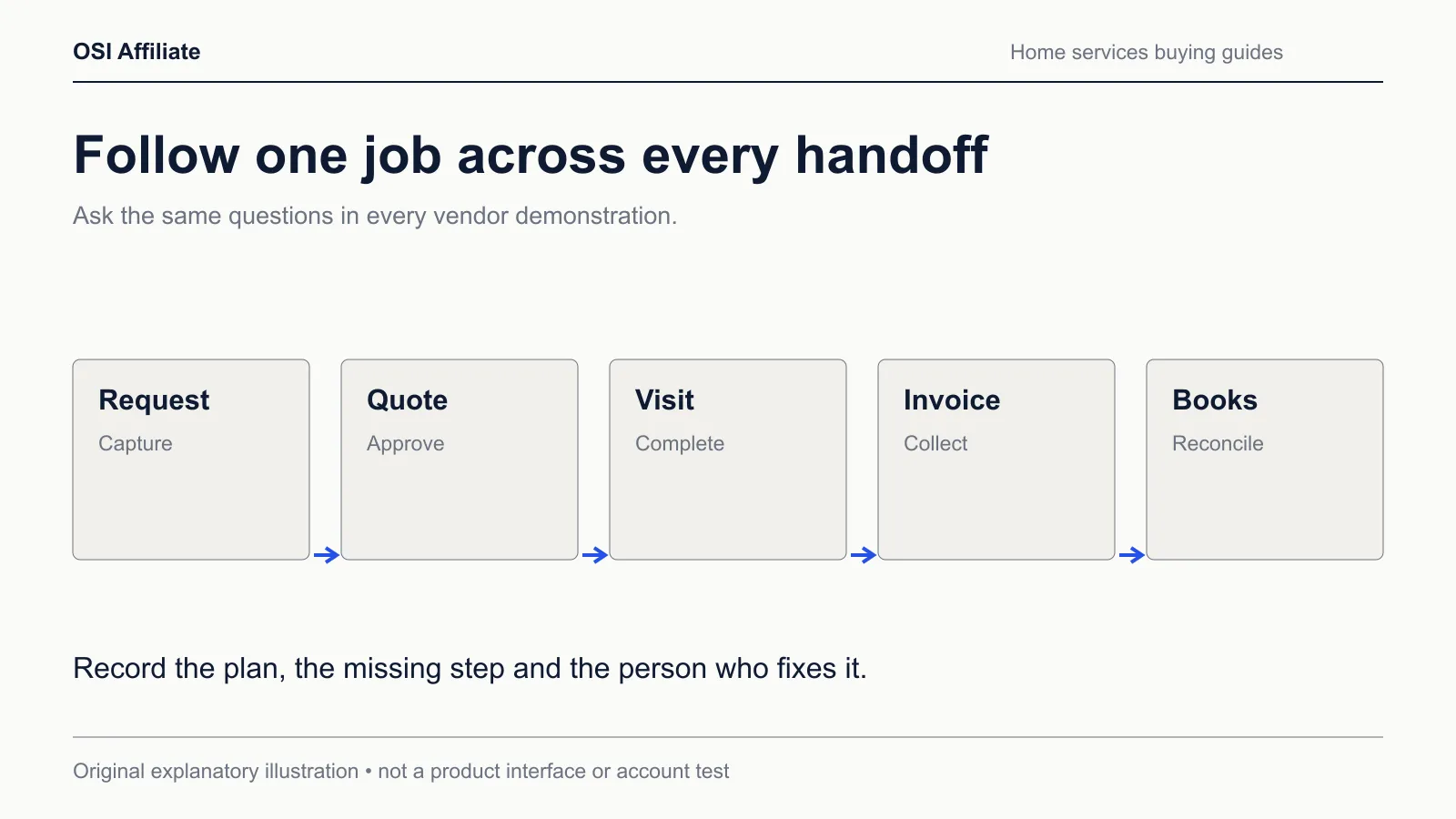
The decisive test isn’t a feature list — it’s whether a synthetic job survives the trip from request to invoice to your books without someone re-typing it. Our blank field-service scorecard lets you score each vendor against your own requirements, and the synthetic pilot worksheet is a fictional request-visit-invoice workflow with result fields left blank until you observe them in the actual trial.
Here’s the shape of the pilot:
- Create a fake customer with a property address and a service history.
- Build a quote for a repeatable job, approve it, and convert it to a scheduled visit.
- Run the visit on the mobile app: notes, photos, time, and any added part or fee.
- Generate the invoice from the visit and record a test payment.
- If any part of the operation syncs, push that record to a sandbox or isolated synthetic accounting file — with a backup and, ideally, your accountant supervising — not a duplicate live ledger.
- Mark what you observed in the worksheet. Any field you could not verify stays blank.
Leave the result fields blank until the trial shows you the answer. The worksheet is a recording tool, not a claim that every product exports every field or that every sync fires on a universal trigger. We did not run account-level trial tests ourselves, and it would be wrong for this page to imply the pilot has pre-filled results.
Migration, adoption and the staying-put case
If you already have a working tool, consider whether switching is the cheapest way to remove the friction. The cost of a migration is not the export button. It’s the weekend of matching customer names, re-creating price lists, retraining whoever holds the schedule, and discovering that the new connector handles refunds differently from the old one. We did not verify export/import parity for any of these vendors, so treat every claimed “easy migration” as a pilot hypothesis, not a settled fact.
Adoption sits on the same ledger. A tool the field tech won’t open is worse than a spreadsheet the office hates but keeps. Cost your own time: if a better-connected system saves you 40 minutes a week of re-entry at a $30/hour internal rate, that’s about $1,040 a year by the example math — an adjustable hypothetical, not a measured result. It covers part of the Jobber Connect premium for a one-person shop. It does not cover a five-person crew’s cost, because the calculation is yours to run with your own hours.
Which one should you pick?
If you’re a solo owner-operator and scheduling plus client history is the whole problem, start with FieldVibe Solo free. When the job needs quotes and invoices, Solo Pro at $20/month is the next honest step. The cheapest paid plan that fits is a better first purchase than the most famous plan you’ll underuse.
If quote-to-invoice and follow-up are the daily job, start with Jobber Connect, not Core, if QuickBooks Online or automated reminders matter to you. The entry tier is real, but the tier that matches your workflow is one step up, and that’s the number to compare.
If QuickBooks Desktop is non-negotiable, put Housecall Pro on your call list and ask for the exact eligible plan, team size, Desktop version and sync direction in writing before you compare dollars. Then compare it to Jobber’s Connect quote on the same team size.
If your operation is already running enough dispatch volume, technicians and back-office reporting to justify the rollout, ServiceTitan earns the demo. Scope the tier that includes the features you need and get the per-technician quote against your actual count.
If you’re staying put, use the scorecard to name the friction you’re trying to remove before you move, and run the pilot against your current tool first. Sometimes the upgrade is a process fix wearing a software-shaped hat.
How we researched this
We reviewed current official pricing, feature and integration pages from FieldVibe, Jobber, Housecall Pro and ServiceTitan on October 18, 2026, for a US buyer, with prices in USD excluding tax. The evidence basis is primary-source vendor documentation and public rendered pages; we did not create paid accounts, execute imports or exports, run timed usability comparisons, or test connectors in working accounts. Screenshots reflect public documentation captured on that date, not logged-in use. Jobber’s legacy-vs-new QuickBooks distinction is drawn from the vendor’s help page banner and article content; we treated anything outside that scope as unknown rather than inventing behavior. We did not verify a confirmed Housecall Pro or ServiceTitan plan price and left those fields as custom quotes.
You can read more about our editorial method and about OSI Affiliate. If you spot a price, plan or connector change, please contact us and we’ll re-verify the affected section. Substantive review date: October 18, 2026.
Affiliate disclosure: OSI Affiliate may earn a commission from qualifying purchases made through some links on this page. That commission never determines which products appear, in what order, or what we say about them. We recommend with the stated limitations regardless of whether a vendor pays us.

Written by
OSI Affiliate Reviews DeskEditorial team
Business-software reviews, comparisons and buying guides for small teams. We compare vendor documentation and pricing, explain the limits of our evidence, and identify affiliate links. Each guide states whether it includes account testing, public demos or documentation research.