ActiveCampaign review: features, pricing and who it is for (2026)
 OSI Affiliate Reviews DeskEditorial team
ActiveCampaign is worth paying for when your email is a repeatable system rather than a weekly newsletter: a lead magnet sequence, a follow-up sequence with different paths, behavior-triggered follow-up, or sales handoff logic someone in-house actually wants to own. The buying decision turns on one distinction worth checking: a five-action linear automation on Starter is not the If/Else branching of Plus, and neither includes the full-path Split experiments, predictive sending and conditional content that sit behind Pro. A trial that feels like Pro does not mean the cheapest plan can run the result you just built.

The condensed case, with the limits attached
Consider ActiveCampaign if you run a recurring follow-up path where the next message depends on what a contact did or didn’t do, and you can name one owner who will build, test and maintain that logic. The automation builder is the reason to choose it; most of that documented depth justifies itself only when you use it.
Skip it or look at a simpler tool if you send one newsletter a week, want a low-maintenance list-and-broadcast workflow, or have nobody who will own a branching automation after launch. Paying for automation depth you never open is the expensive path.
The durable strengths we can support from documentation and a public product tour:
- Workflow logic is the purpose, not a bolt-on. Plan documentation and the action matrix organize the product around triggers, conditions, waits and actions. The tier gates below are more important than the marketing language around them.
- Automation and contact context live in one place. The platform keeps contacts, tags, lists and scoring against the same record that feeds campaigns. That is a native contact database, not a full sales CRM included in the base email plans; the paid sales add-ons are covered later.
- The trial gives you a Pro-like look at the machine. It is a useful evaluation surface, but it does not prove what Starter or Plus will let you do after the clock stops.
The honest tensions:
- The tier that runs a branched workflow is not the cheapest tier. Plus is where If/Else appears, and Pro is where whole-path experiments and conditional content appear. Work out your required tier before you fall for an entry price.
- New accounts pay for the whole stored list, not just active contacts. Accounts created on or after November 3, 2025 count every contact regardless of list status. That makes pre-import hygiene and archiving a recurring cost decision, not a one-time chore.
- A higher-tier trial can fool you. You can build something in the trial that your intended paid plan cannot run.
Which plan runs the workflow?
| Plan | Automation ceiling that matters | Included users | Campaign send multiplier | What it is for |
|---|---|---|---|---|
| Starter | Up to 5 actions per automation; send email, wait, list, tag, archive; no If/Else | 1 | 10× contact capacity | Linear sequences: welcome, single follow-up, simple onboarding |
| Plus | Unlimited actions; If/Else, Go to, Jump to, Webhook, Update a contact; no Split-path action | 1 | 10× | Branched nurture and decision logic |
| Pro | Split-path testing, Start/End another automation, conditional content, predictive sending, custom event tracking | 3 | 12× | Full-path experiments and optimization |
| Enterprise | Pro set plus SSO, custom reports, premium CRM integrations | 5 | 15× | SSO, custom reports and premium integration requirements |
Sources: plan overview and automation action matrix, retrieved October 16, 2026. Starter can purchase one additional user; higher tiers allow added seats, but current per-seat pricing was not captured and requires a quote.
In a hypothetical onboarding sequence, a list-subscribe trigger followed by wait one day, send a setup email, wait two days, and send a second email uses four actions. The trigger starts the automation rather than counting among the actions, so the sequence fits Starter’s five-action ceiling. Add one decision: “If the contact opened the first email, go to path A; if not, go to path B.” That single If/Else requires Plus even though the action count is still small. Add a full-path experiment running two whole sequences against each other, and the Split action pushes the requirement to Pro. We have not executed this workflow in a paid account; it illustrates the documented gates only.
Don’t confuse campaign-email A/B testing with automation Split-path testing. Email split tests compare variations inside one send. The Split action experiments on whole paths, with different sequences feeding the comparison, and current documentation places that action on Pro or Enterprise.
Contact scoring has its own split. Contact Scoring, the action that adjusts a score on a contact record, is documented on Marketing Plus and above. Deal Scoring belongs to sales plans. A contact-score action does not establish that full sales pipelines and deal scoring come with base Plus. The CRM check below separates those entitlements.
What it costs at your contact count
ActiveCampaign prices by stored contacts, not by flat team seats, and the bill moves at multiple points at once: contact tier, automation feature tier, included users, add-ons, and send allowance. The table below uses the official live US annual-billing route we captured on October 16, 2026. Monthly equivalent means the displayed rate when you pay annually, not month-to-month billing.
| Contacts | Starter | Plus | Pro | Enterprise |
|---|---|---|---|---|
| 1,000 | $15/mo · $180/yr | $49/mo · $588/yr | $79/mo · $948/yr | $145/mo · $1,740/yr |
| 2,500 | $39/mo · $468/yr | $95/mo · $1,140/yr | $149/mo · $1,788/yr | $255/mo · $3,060/yr |
| 5,000 | $79/mo · $948/yr | $145/mo · $1,740/yr | $205/mo · $2,460/yr | $375/mo · $4,500/yr |
These are base annual prices excluding taxes, extra seats, add-ons and overage. The current verified base rates can change; check the official pricing page before buying and treat renewal quotes as the binding number.
For a 1,000-contact list with one branched nurture, Plus costs $588/year. If your workflow genuinely requires full-path experiments or conditional content, Pro at $948/year buys that different capability bundle. The cheaper annual number is only cheaper if you don’t actually need the gate behind the higher one.
Two pricing mechanics deserve a separate check:
- Total stored contacts, not just emailable contacts. For accounts created on or after November 3, 2025, unsubscribed, bounced and unconfirmed contacts all count toward capacity (contact limit policy). Older accounts may follow active-only billing. A “prune before you import” instruction is too shallow: preserve suppression and consent history instead of deleting unsubscribes so you can email them again. Archived records don’t count toward capacity but are read-only, retained for a limited window, and subject to monthly archive limits. Do not generalize one account’s cohort or a competitor’s price history into a product-wide promise about your bill.
- Sends and contact capacity are separate limits. Current plans include campaign sends of 10× purchased contact capacity on Starter/Plus, 12× on Pro, 15× on Enterprise. Direct and automated campaigns count; one-to-one and transactional sends are excluded from that allowance. If you exceed the send allowance without raising it, ordinary overage is documented at $0.005 per send (send limit policy). Reaching the contact capacity is different and worse: campaigns cannot send and automation email steps are skipped while contacts continue. Don’t let a send-forecast discussion hide a contact-capacity failure.
Extra seats, SMS, and every sales add-on change the total but were not captured as current quoted prices here. Plan for those as quote line items, not estimates. The plan checker below keeps those fields separate rather than inventing a fake linear formula.
What the workflow and AI surfaces show
We traversed ActiveCampaign’s public guided product demo to document configuration surfaces, not to claim we ran an automation. The tour showed a simulated canvas with email and wait blocks clearly visible, plus a guided-tour overlay; the wider traversed tour also displayed branch and tag blocks, but this specific capture obscures most of the workflow behind that overlay.
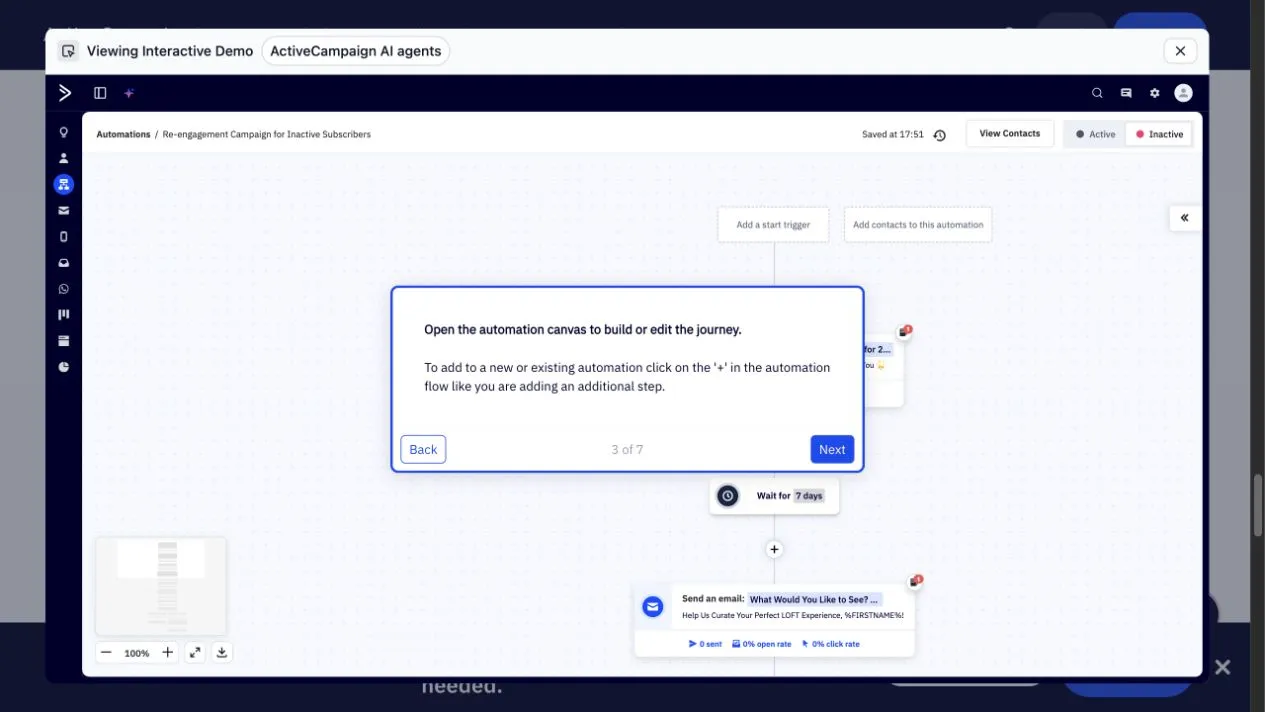
A workflow is a chain of named steps with data moving through them. If the next step depends on a tag, field or list membership you haven’t captured, the condition may not match the contacts you intend. Every branch deserves an explicit exit, an unsubscribe-preserving path, and a human check that the condition actually matches real data.
The AI Actions Library section showed actions such as Summarize, Analyze, Translate, Classify intent and Determine sentiment. The sentiment configuration showed a source field and an output field, both initially unselected, with Save disabled.
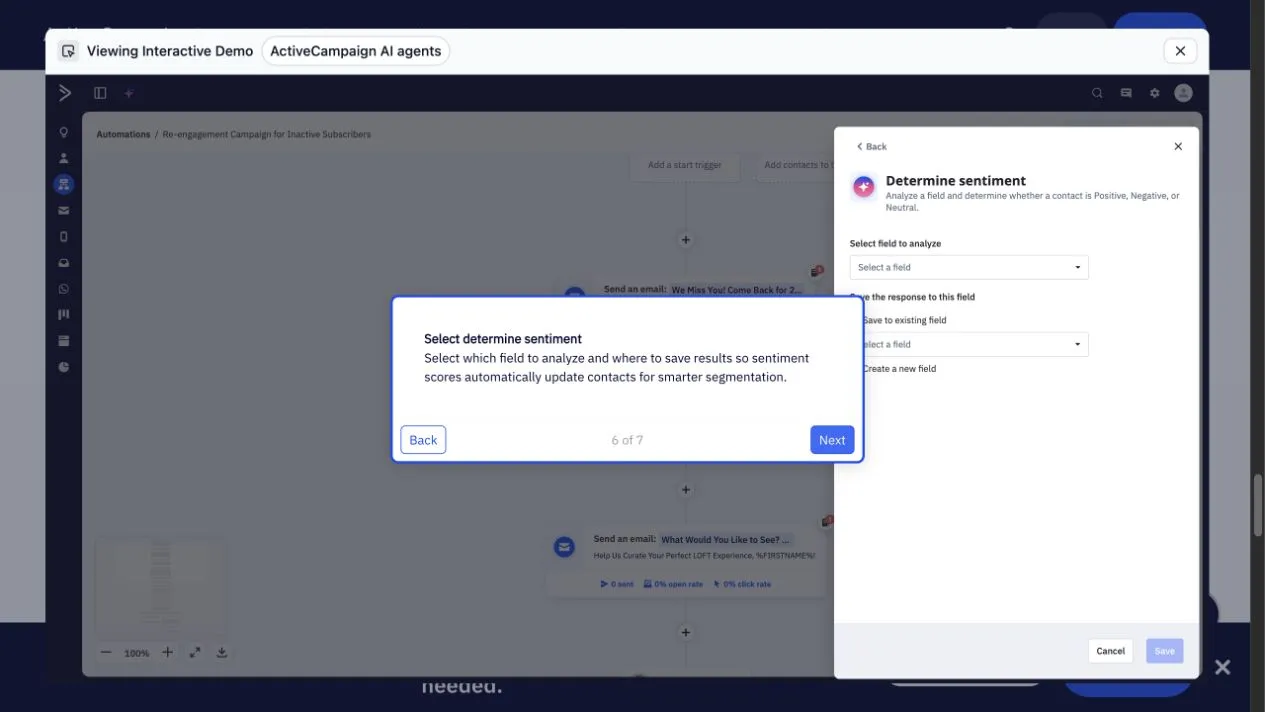
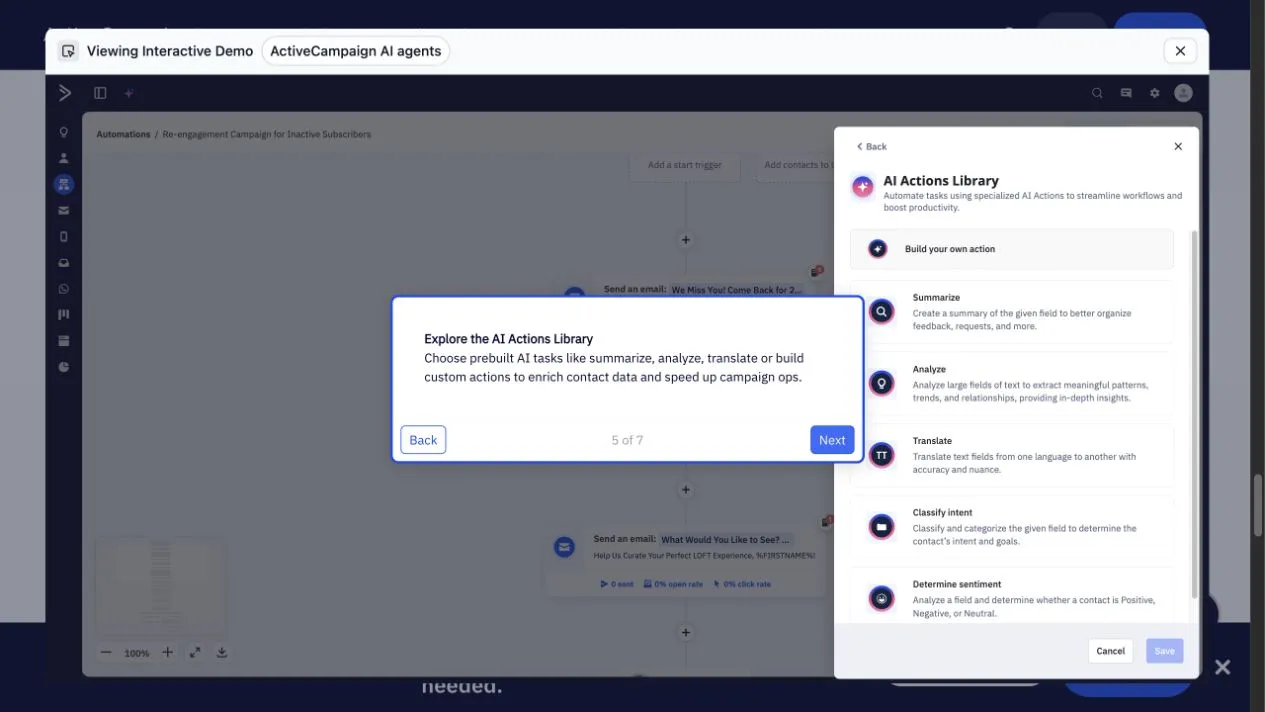
The buying lesson is not “AI is powerful.” It is that AI steps are configured like any other action: input, output, routing, and a place for neutral, negative or missing results. A sentiment action that writes “negative” into the wrong field is a data problem, not an intelligence problem. Treat these as structured field operations with a credit cost.
That credit cost is now documented specifically. The October 16, 2026 AI credit FAQ says paid plans include 500 pooled credits monthly and the trial includes 100, with no rollover; additional packs of 100 credits start at $10 per month. When credits run out, AI Actions Library steps are skipped while contacts continue, and some scheduled or image/translation actions pause. Normal campaigns and non-AI automation continue. Older marketing pages describe AI differently; we use the current, specific FAQ for this review. We did not deliberately exhaust credits to test behavior, and account-specific terms still deserve a checkout check.
Email authoring and forms follow the same gate logic as automations. Starter includes the email designer, forms, campaign reporting and campaign A/B tests. Plus adds landing pages plus basic reporting and analytics. Professional (the help-center name for the tier marketed as Pro) adds advanced reporting and revenue and conversion attribution; Custom Reports is a paid add-on on Plus and Professional and included only on Enterprise. Before paying, confirm that the report you need to judge your workflow is on your intended tier or a quoted add-on, rather than relying on a mention of “advanced reporting”. Attribution associates revenue or conversions with marketing activity; it asks more than an open count can answer. We did not test the editor or analytics accuracy hands-on, so we offer no usability verdict or template count.
What to verify before moving your list
The trial is Pro-like, not your paid plan’s proof. The documented 14-day trial includes one user and up to 100 email sends in total, and is based on Professional plus CRM access. Test emails in the trial go only to the trial user’s address and require a verified sending domain. The trial excludes SMS sending and credits, custom landing-page domains, Preference Center, and the Email Results form action. Trial Professional plus CRM access still does not prove what a paid Starter or Plus plan will run; re-check anything you build against the intended paid tier’s action matrix.
Sales CRM is an add-on, not a base email entitlement. Sales deal pipelines require a paid Pipelines or Sales Engagement add-on on Plus or higher, and automated one-to-one email requires Sales Engagement. SMS is also an add-on on Plus or higher. The platform can store contacts natively and support paid sales features. Check the current add-on price and unit before planning around it.
Authentication and support. You must verify a sending domain before real sends. The documented setup covers DKIM, SPF and DMARC. Authentication is not an inbox-placement guarantee and we did not measure deliverability. Documented English human chat support for paying customers is reached through the AI assistant, Monday–Friday 3am–11pm CT and Sunday 6pm–11pm CT, with email and self-service as other channels. That is a route description, not a quality or speed claim.
Import and export have asymmetric limits. CSV import can map fields, tags and lists, update matching contacts, and trigger active automations. An explicit “Trigger Automations” toggle in Advanced Options controls that behavior. Use fictional sample data and turn that off while you verify mappings. AI-assisted import has update, trigger-automation and webhook toggles off by default. On the way out, standard contact CSV export includes selected fields, tags and scores, but it excludes notes. Contact and deal notes have a separate route: an API route retrieves existing notes, while the documented webhook-to-Zapier path captures new notes going forward. Don’t assume the standard contact CSV includes existing notes, and don’t count on Zapier pulling down your full note history.
Assisted migration is real but scoped. A May 2026 release describes a partner API extraction route followed by AI review and import, with a rollout described for Mailchimp switchers. Manual CSV and AI-assisted imports are separate from that route. None of this is a universal no-downtime promise. Our moving email platforms guide covers the sequencing issues that change the outcome.
Workflow rebuild is the hidden migration cost. Automations and templates don’t necessarily port as one click. Inventory every live workflow, every exit condition, every suppression rule, and every integration event before you decide whether the switch is worth it. Check your own rebuild path before treating another user’s migration experience as a forecast.
Use the plan checker and pilot worksheet
We built two assets to turn the paragraphs above into a decision you can run before paying.
- Open the ActiveCampaign plan and pilot checker is an interactive browser companion that takes your stored-contact estimate, expected campaign sends, users, and the workflow flags that matter (If/Else, five-action ceiling, full-path experiment, predictive/conditional content and sales pipeline needs). It returns the minimum documented base tier for those capabilities, flags add-on or quote requirements, and keeps first-year and later-year arithmetic separate.
- Download the blank pilot checklist is a generic CSV worksheet for running your own import, automation, export and handoff checks with fictional data. It is not an imported automation and proves nothing by itself; it is the empty test plan.
Which ActiveCampaign plan fits your workflow?
Check a documented feature floor, contact capacity and send budget before starting a pilot. This worksheet does not replace a vendor quote.
Workflow feature floor
Branching or more than five actions moves this example beyond Starter.
- First year: plan + entered costs
- $588.00
- Later year, same entered costs
- $588.00
- Monthly email allowance
- 10,000 sends
Your forecast fits this example’s send allowance.
US Email pricing checked 16 October 2026. Public examples are monthly equivalents billed annually.
Features beyond those selected, integrations, seats beyond the standard allowance, SMS, WhatsApp, AI extras, tax and implementation may change your quote. This is a feature check, not an automatic purchase recommendation.
First year = whole-account monthly equivalent ×12 + monthly extras ×12 + setup costs. The later-year estimate omits setup costs. Public examples cover only the three contact bands shown. Entries stay in this browser; the CSV includes your assumptions and blank pilot checks, not completed test results.
The tool identifies the minimum documented tier; it does not score the product. It does not claim to evaluate enterprise-only needs, and it will not invent contact pricing between the three verified bands. If you need extra users or sales add-ons, the tool flags quote requirements instead of pretending a linear formula answers them. A compatible whole-account quote you enter changes the arithmetic, but it never changes the minimum documented automation tier.
The five pilot checks we’d insist on, matching the worksheet:
- Run a branched workflow from trigger to exit using fictional contacts, including the unsubscribe or inactive path, and record which paid tier the action matrix actually requires.
- Set the import toggle to not trigger automations, then verify fields, tags and suppression state before you import anything real.
- Authenticate a sending domain in advance, and send test messages only to an owned address.
- Export a small sample after testing, compare the standard CSV fields against what you need, and separately check how existing notes retrieve through the API and how new notes flow through the webhook-to-Zapier route.
- Name the AI input and output fields for any AI step you plan to use, and define the routing for neutral, negative or missing results before launch.
Leave every blank result as a test you haven’t run. The worksheet’s value is that it makes the unrun tests visible instead of letting enthusiasm fill them in.
Choose, stay, or investigate another tool
Choose ActiveCampaign when a branched nurture or behavior-triggered follow-up is central, you know which automation tier you need, and you can accept Plus or Pro pricing with the contact and add-on quotes on top. Stay or reconsider if you are already on ActiveCampaign and your current workflows work. Compare your actual renewal quote against the work and risk of rebuilding automations, remapping integrations, and verifying what exits cleanly, including suppression state, fields, tags and notes. Use that comparison to judge your switching costs; whether it saves money or is worth the risk depends on your situation. Investigate another tool when you only send newsletters, have no in-house automation owner, or your concern is avoiding a migration you can already see coming.
For the newsletter-only reader, GetResponse and AWeber are the two related review destinations on this site worth opening next. The Marketing & Automation shortlist is the right place to compare the category side by side.
How we researched this review / Affiliate disclosure
Who made this: OSI Affiliate is the organizational author. We research and recommend business software for small teams with a short, opinionated shortlist rather than an exhaustive directory. Our full selection method is in How We Pick, and you can read more about us on the About page.
Evidence basis: This refresh relies on current ActiveCampaign help-center and plan documentation, the official pricing page captured live in US dollars on October 16, 2026, a fully traversed public guided product demo, and the three ranked competitor reviews our research identified in a current Google first-page sample for “activecampaign review.” We read those pages to locate the questions buyers actually ask and the gaps we could close; we did not adopt their testing histories or unverified claims. There was no logged-in account test, email send, contact import, AI inference execution, export run, support-speed benchmark, deliverability measurement, or performance test. Our plan checker and pilot worksheet are original decision aids, not executed tests.
Volatile facts: Prices, plan limits, action gates, send multipliers, trial scope, AI credit allocations and add-on availability were verified against primary sources on October 16, 2026, and should be re-checked at purchase time. Exact per-seat, SMS, sales add-on, monthly-billing and cancellation terms were not captured and require a vendor quote. The last substantive review date reflects this material refresh, not a routine touch-up.
Affiliate disclosure: OSI Affiliate may earn a commission when readers buy through links on this page. Our inclusion, order, caveats and verdicts are set before any vendor relationship is considered, and no vendor can buy a recommendation or review approval. Compensated links are marked in production with the appropriate sponsored treatment. A vendor link here is a next step after the reasoning, never evidence that the conclusion is right. If you find an error, contact us through the site’s correction path; our full disclosure explains the commercial context in plain language.

Written by
OSI Affiliate Reviews DeskEditorial team
Business-software reviews, comparisons and buying guides for small teams. We compare vendor documentation and pricing, explain the limits of our evidence, and identify affiliate links. Each guide states whether it includes account testing, public demos or documentation research.