Jobber vs Housecall Pro: Which Fits Your Small Service Business?
 OSI Affiliate Reviews DeskEditorial team
Both turn a request into a quote, a quote into a scheduled job, and a job into an invoice somebody can pay from a phone. The decision shows up later, in the two places that cost you evenings: how work enters your system, and whether the right records land in your books without you retyping them.
Jobber’s useful floor for this workflow isn’t the cheap Core plan in the headline. The bundle that matters — QuickBooks Online sync plus automated quote and invoice follow-up — starts on Connect, at $139/month for one user paid month-to-month. Housecall Pro’s equivalent number won’t sit on a static page for you. Its current US pricing route asks for your industry, team size, and goals before showing a tailored price, so you budget it as a quote, not a sticker.
| Your situation | Start with | What to verify first |
|---|---|---|
| Visit-first work; quotes need follow-up; QuickBooks Online is your accounting route | Jobber, using Connect as the real floor for your required bundle rather than Core | That test records push from Jobber into QuickBooks Online, in a test file or sandbox first |
| QuickBooks Desktop matters | Housecall Pro | Get the exact tier, team count, and Desktop edition in writing |
| You’re choosing mainly to stop retyping invoices | Either, with QuickBooks as the shared requirement | Which QuickBooks edition your accountant will accept this year |
Why the features alone won’t decide this
Both platforms cover the quote-to-paid spine. On either, you can create a customer, send a quote, convert it to a job, schedule someone, invoice, and take an online payment. Both publish online booking. Both document marketing options. If you spend the first hour checking feature boxes, you’ll get a draw.
The real differences sit underneath: where the automation floor starts, how much of the price is published, and which QuickBooks edition the connector actually supports. Those are the ones that change your Monday.
Where the automation starts. This is where Jobber’s pricing page tells you more than Housecall Pro’s. On Jobber, automated quote follow-up, reminders, checklists, QuickBooks Online sync, and time and expense tools are explicit Connect-and-up features. Housecall Pro publishes the same kinds of tools — recurring agreements, job costing, campaigns, review requests — but the public pricing flow doesn’t show which tier includes them. That means you can price the exact Jobber floor today, and you cannot price the Housecall Pro equivalent until a rep answers.
Jobber: the price is visible
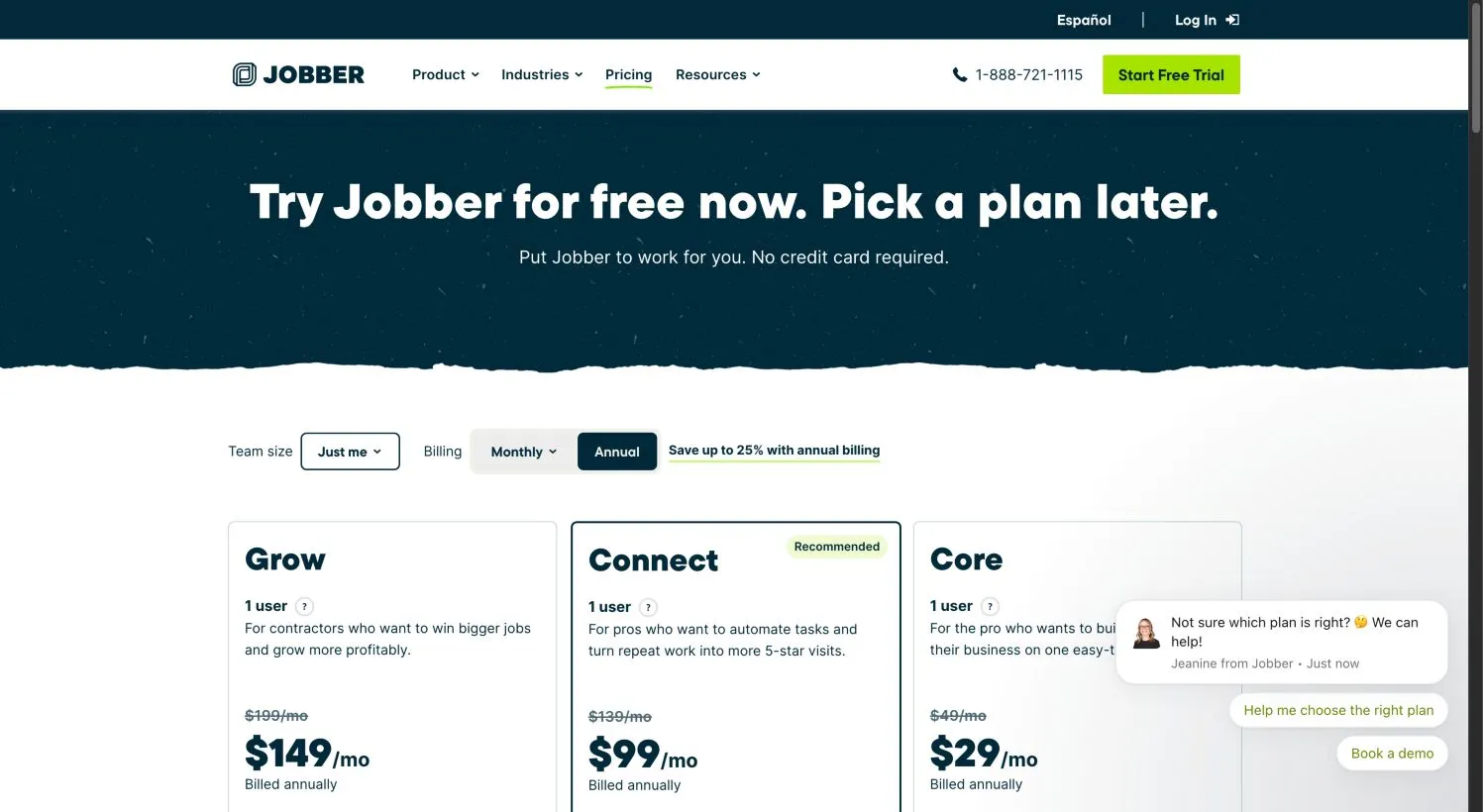
Jobber’s Core plan for one user: $49/month month-to-month, $39/month with a 12-month commitment billed monthly, or a $29/month equivalent when prepaid annually. Core genuinely includes quotes, scheduling, invoicing, online payment, and online booking. What it doesn’t include is the part a busy shop will feel first: QuickBooks Online sync and automated follow-up on quotes and invoices. Those enter on Connect.
At one user, Connect is $139/month month-to-month, $119/month on a 12-month commitment, or $99/month as the annual-prepayment equivalent. That’s the floor to build a decision around if your required bundle is QuickBooks Online sync plus automated quote and invoice follow-up. The next step up, Grow, adds job costing, two-way SMS, richer quotes, and custom workflow automation at $199/month month-to-month for one user. These are bundled user counts — 1, 5, 10, or 15 — not a clean per-seat line, so pricing jumps rather than scaling smoothly.
A few packaging notes the pricing page rewards you for reading. The 14-day trial starts on Grow, not Core — so it may show you a higher tier than the plan you end up buying. Payment processing is a separate fee on top of your subscription: the page shows 2.9% + 30¢ for online card payments, 2.7% + 30¢ for tap-to-pay, 1% for bank transfers, and an extra 1% for instant payouts. The Marketing Suite and some review tools sit outside the base plans as add-ons. Route optimization and GPS tracking appear in the feature set, but our public capture didn’t map every item to a specific tier, so ask before you assume Core covers routing.
Skip Jobber if you’re on QuickBooks Desktop, or if nobody in the office will actually work the follow-up sequences the plan charges you for. We keep a longer Jobber review if you want the full day-to-day accounting.
Housecall Pro: budget a quote, not a price
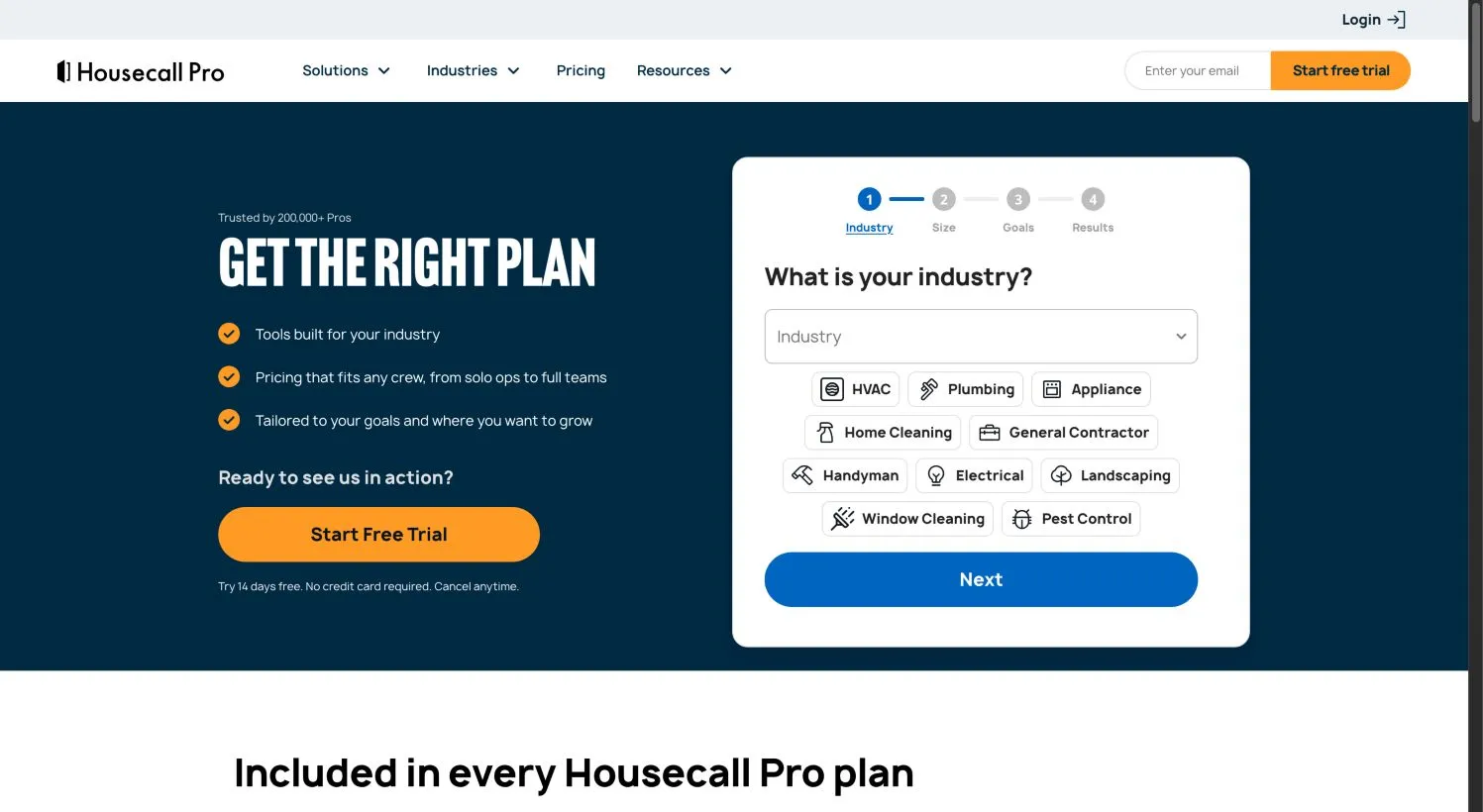
Housecall Pro’s pricing page is a guided funnel, not a published grid. You pick an industry, team size, and goals, and it serves a tailored plan. The page’s title still whispers “from $59,” but we could not match that number to a specific plan, team count, or billing cadence in the rendered page captured October 18, 2026. So don’t hand that to your bookkeeper. Treat Housecall Pro’s price as an unknown you resolve in writing.
What’s documented clearly: the platform covers booking, dispatch, estimates, invoicing, job costing, recurring service agreements, payments, and reporting. The feature set isn’t the question. The question is which tier your crew size lands in and what the add-ons cost. Housecall Pro also lists card processing “as low as 2.59%,” plus campaign, review, GPS, and answering-service extras — exact rates and inclusion depend on your package.
The trial is 14 days with no card, and the flow invites you to try it on real jobs. That’s a good pilot if you already know what you’re validating. If you’re still comparing, use it to run the same test job you run in Jobber, which the section below walks through.
Skip Housecall Pro if you need a published price before you’ll even book a demo, or if you’d rather not start with a sales conversation to reach a total price.
Like-for-like cost: what October 2026’s pages actually give you
Jobber’s numbers are published; Housecall Pro’s are not. That asymmetry is part of the answer.
| Configuration | Displayed rate (US, captured Oct 18 2026) | Year-1 subscription |
|---|---|---|
| Jobber Core, 1 user, month-to-month | $49/mo | ≈ $588 |
| Jobber Core, 1 user, annual prepaid equivalent | $29/mo | ≈ $348 |
| Jobber Connect, 1 user, month-to-month | $139/mo | ≈ $1,668 |
| Jobber Connect, 1 user, annual prepaid equivalent | $99/mo | ≈ $1,188 |
| Jobber Connect, 5 users, annual prepaid equivalent | $149/mo | ≈ $1,788 |
| Jobber Grow, 5 users, annual prepaid equivalent | $229/mo | ≈ $2,748 |
| Housecall Pro, solo or small crew | Tailored quote | Ask in writing |
Annual figures here are estimates from the displayed monthly equivalent, not a checkout total. Jobber’s prepaid route bills the full term up front, and its FAQ says that payment is non-refundable if you cancel during the year. QuickBooks itself is a separate bill on both sides: Housecall Pro’s page explicitly says QuickBooks is not included, and Jobber describes QuickBooks Online as a sync target rather than a bundled subscription. Payment processing fees sit on top of every number above.
QuickBooks: the edition split that ends arguments
If your accountant’s office answers “Desktop” when you ask which QuickBooks you run, that may have just decided the question. Jobber’s current first-time connection is QuickBooks Online, with a one-way, real-time push from Jobber into QuickBooks. Its older “legacy” connector moved some records both ways, but it was manually triggered, and Jobber’s own help page now flags that setup for migration. New connections use the Online route, and moving to it can’t be undone.
Housecall Pro’s feature page states support for both QuickBooks Online and Desktop, with customer info, invoices, line items, and payments pushing into QuickBooks, plus imports. That makes Desktop support a documented Housecall Pro strength — with a caveat. The public page doesn’t tell you every edit that syncs back, which Desktop edition or year is covered, or which Housecall Pro tier includes the connector. Those belong in your written quote and your pilot, not in a happy-path screenshot.
If you record payments in Jobber, the documented one-way push into QuickBooks Online can cover the common path from Jobber into your books — but “can cover” is not the same as “your records will behave the way you expect.” Don’t trust it from a marketing page. Run the record-level checks below before you commit, and keep an eye on the fields that don’t sync automatically. Desktop shops should weigh Housecall Pro’s documented route before trying to bend Jobber into a workflow it doesn’t currently advertise. Our QuickBooks field-service guide goes deeper on the record-level checks.
Run one test job through both trials before you pay
Both trials last 14 days. Jobber’s runs on Grow so you can see a higher tier, but that also means a trial you like can be a paid plan you didn’t budget for. Use our worksheet to keep the two runs comparable.
Open the Jobber vs Housecall Pro worksheet, list your three highest-volume services, mark how each starts — book or quote — and note your QuickBooks edition, team count, and the automations you can’t live without. Then run this sequence in each product:
- Create a customer and a quote with two line items; convert it to a job; invoice; record payment.
- Turn on follow-up and reminders, pointing them at your own email address.
- For the accounting check, do not connect your live company file as the first step. Use a test QuickBooks company file or a sandbox environment, or ask your accountant to supervise an isolated pilot. Back up before any connection attempt, then create a test invoice and confirm what lands without manual steps.
- Export the client list to CSV before importing real data.
- For Housecall Pro, get the tier, user count, and QuickBooks edition on the quote in writing.
Leave the observed-result fields blank until you’ve actually run each step. A blank field is a truthful to-do, not a passed test.
Staying put, switching, or looking wider
If you’re already on one and merely annoyed rather than blocked, the cost of switching isn’t just the subscription delta. It’s the export, the re-entry, and the rebuilding of recurring jobs and follow-up sequences. Neither vendor promises in our sources that every field exports perfectly, so before you move, run an export on each side and count the re-entry work honestly. A switch that looked cheap on a pricing page can eat a weekend of rekeying and still leave gaps in your history.
If neither fits and you need a custom-quoted enterprise platform, the Jobber vs ServiceTitan comparison is the next useful page. If your budget says “free or nothing,” the free field-service guide covers real free-plan boundaries rather than trials dressed up as free.
Which one should you start with?
We choose a written price request over an advertised number here because the current public pages don’t offer a fair Housecall Pro comparison price — and a decision made on the wrong package is a bad one, even when the number looks cheaper.
Method and limits: This page was written and checked by OSI Affiliate. It compares public pricing, help, and feature pages captured October 18, 2026, for a US buyer; prices exclude tax and can change. We did not open paid accounts, run timed usability tests, or measure revenue outcomes. Housecall Pro’s eligible price remains unknown because its public flow uses tailored quotes; Jobber annual figures are calculated from displayed monthly equivalents. Corrections: contact us through the site if a plan or price has changed. Read how we pick software and about OSI Affiliate for more on our method and standards.
Affiliate disclosure: OSI Affiliate is reader-supported. We may earn a commission if you buy through qualifying links on this page. That commission never decides which products we include, the order they appear in, or what we say about them. Every recommendation above was made independently of any vendor relationship.

Written by
OSI Affiliate Reviews DeskEditorial team
Business-software reviews, comparisons and buying guides for small teams. We compare vendor documentation and pricing, explain the limits of our evidence, and identify affiliate links. Each guide states whether it includes account testing, public demos or documentation research.