Webflow Review: Is the Design Control Worth the Work?
 OSI Affiliate Reviews DeskEditorial team
Webflow keeps coming up when a marketing or content site is supposed to feel like a real brand asset, not a template with your logo on it. The honest question isn't whether Webflow is good. It's whether you or someone you'll pay will actually do the design work it expects.
Here’s our position: choose Webflow when you need a custom, structured site — a blog, case-study library, service catalog, or portfolio — and someone on your side will own the layout, responsive breakpoints, and publishing routine. Skip it when you need the site up this week and don’t want to think about CSS-style controls again, or when the thing the site exists to do is sell an offer, course, or email list through the same system.
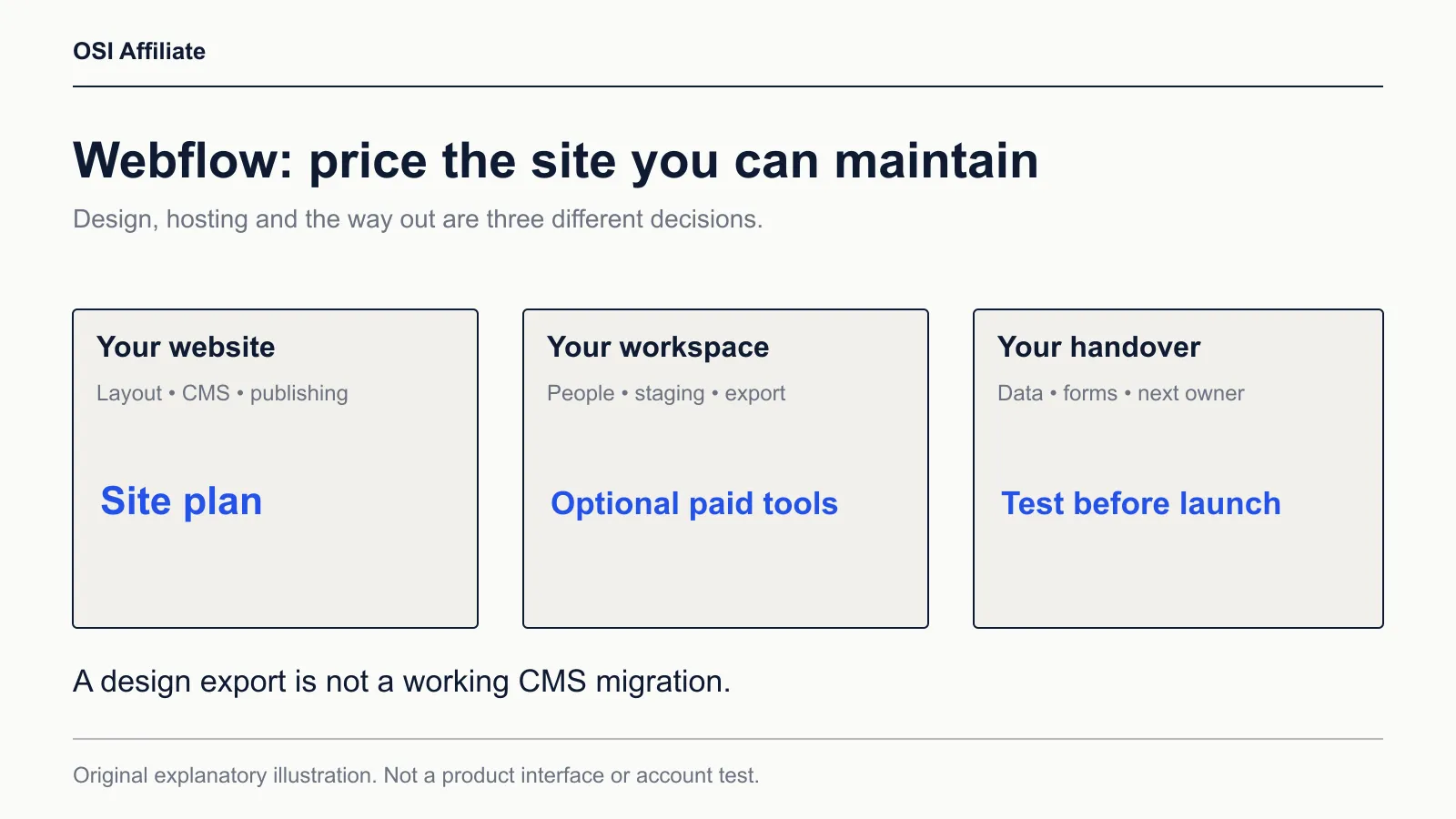
Quick decision: does Webflow fit your job?
| Your situation | What fits | Why |
|---|---|---|
| You need a custom marketing site with a blog, case studies, or a service catalog | Webflow Premium site plan | This is the plan that includes Webflow’s structured CMS. |
| You need a simple site with a custom domain and no blog or CMS content | Webflow Basic site plan | Basic covers static pages, custom domain, and unlimited form submissions, but no CMS. |
| The site is mainly how you book appointments, take payments, or run the business operations | A Wix Core-style plan | Wix puts payments, scheduling, and owner-operated tools in the same plan. |
| The site exists to sell an offer, run a course, or nurture an email list | Systeme.io (our review) | Systeme.io bundles funnels, email, courses, and checkout, including a free tier with real limits. |
Webflow is our pick when design control and structured content are the actual job. It’s the wrong pick when the website is just the front door to payments, scheduling, or an email sequence.
What Webflow is built for
Webflow is a visual web design platform. You work in a canvas that looks closer to a design tool than a drag-and-drop page builder. Under the surface, Webflow is translating your decisions into HTML and CSS. That’s why it gives you control over things like the box model, flex layouts, grid, and breakpoints — the same concepts a front-end developer uses.
The consequence cuts both ways. You can build a site that doesn’t look like everyone else’s template, but you’re also responsible for thinking like a builder. Padding, margins, containers, and responsive behavior don’t disappear because the interface is visual. They’re the interface.
The other half that often gets underrated is the CMS, which Webflow puts on the Premium site plan rather than Basic. A CMS, or content management system, stores repeatable content in structured collections. For a blog, you’d set up a collection for posts with fields like title, author, date, body, and featured image. You design one template page once, then every new post pulls from that same structure.
The business consequence is real: adding a case study or a job posting doesn’t mean hand-building another page. But someone still has to set up the collection, the fields, the template, and decide how the layout behaves at different screen sizes. That’s design work, not just data entry.
Who should choose Webflow
Webflow makes the most sense when you can already name the person who’ll maintain the site. That could be you, an in-house marketer who’s willing to learn it, or a hired designer or Webflow specialist.
You’re a good fit if:
- Your site is a brand asset, and “close enough to the template” isn’t acceptable.
- You have repeatable content — posts, cases, locations, team members, resources — that should stay visually consistent as it grows.
- You want direct control over metadata, alt text, canonicals, sitemaps, and redirects without adding plugins.
- You plan to keep Webflow’s hosted CMS, not export the code to host elsewhere.
You should skip Webflow when nobody on your side wants to learn a design tool. The risk to plan around is a project that stalls partway: the owner gets a beautiful homepage and then doesn’t want to touch breakpoints or class names. At that point, an easier builder that ships a finished site beats a more powerful one that doesn’t.
Current Webflow plans and pricing
Webflow separates site plans from workspace plans. That split trips up a lot of comparisons. A site plan is what you buy to publish and host one website. A workspace plan is about how many staging sites you have and which collaboration or export tools you get. For most small businesses publishing one site, the paid site plan is the decision. You don’t automatically need a paid workspace.
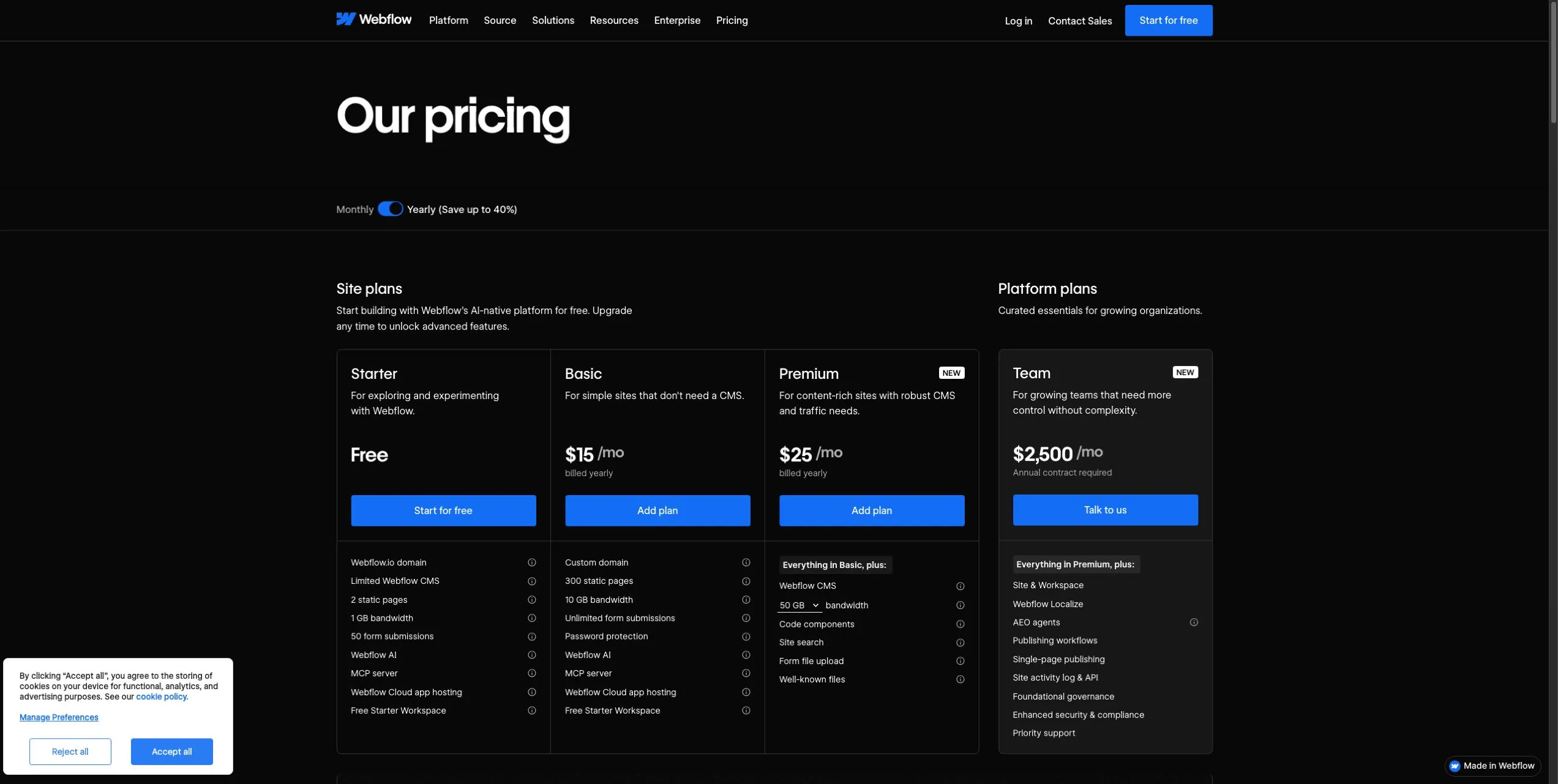
Here’s what Webflow’s pricing page showed on October 18, 2026. Prices are USD per site, before tax.
| Plan | Monthly billing | Yearly billing (billed yearly) | Key limits |
|---|---|---|---|
| Starter | Free | Free | 2 static pages, 1 GB bandwidth, 50 form submissions, limited CMS, Webflow.io subdomain |
| Basic | $25/month | $15/month ($180/year) | Custom domain, 300 static pages, 10 GB bandwidth, unlimited form submissions, no CMS |
| Premium | $39/month | $25/month ($300/year) | Everything in Basic, plus Webflow CMS, site search, form file upload, code components; bandwidth starts at 50 GB with higher tiers paid |
The headline change here matters: the CMS now lives on the Premium plan, which Webflow labels “New” on the pricing page as of October 18, 2026. Current plan names are Starter, Basic, and Premium. Older “CMS-plan” or “Business-plan” names and prices you may see elsewhere don’t match the configuration on the page we checked.
Premium is the documented starting point for a content-rich site. Basic works for a simple site with 300 static pages, unlimited form submissions, and a custom domain, but you won’t get Webflow’s CMS collections or site search on it. That’s the gate to check before paying for a year.
The workspace question
Webflow accounts come with a free Starter workspace. For a small business publishing one site on a paid site plan, that free workspace is usually enough. You don’t need to buy a Core workspace just to use custom code on a paid site, and you don’t need to bundle Premium plus Core as a default configuration.
A paid workspace becomes relevant if you need code export, more staging sites, or specific collaboration controls. Core is $19/month billed yearly ($228/year). Growth is $49/month billed yearly. The Team platform plan at $2,500/month on an annual contract is not a small-business default, and we won’t treat it as one.
One more pricing detail: Webflow’s pricing page says you can cancel, but you still owe the remainder of the committed term. If you pay yearly for the lower rate, that’s a real commitment. It’s worth checking before choosing annual billing for a platform you haven’t used yet.
What a Webflow site actually costs
Let’s turn the plan prices into the cash you’d pay.
A single site on Premium:
- Billed yearly: $25/month, or about $300 for 12 months.
- Billed monthly: $39/month, or about $468 for 12 months.
The annual-equivalent is the lower cash outlay over a year, but it assumes you stay for the term. The monthly route costs more in total but puts less money at stake if you change your mind.
A simple Basic site:
- Yearly: $15/month, about $180/year.
- Monthly: $25/month, about $300/year.
If you need Premium plus Core workspace, the yearly base is about $528/year before bandwidth or add-ons. That combination isn’t the normal publishing setup, but it shows how the bill can climb when someone bundles a workspace plan they may not need.
Add-ons can add up fast. Webflow’s pricing page showed Optimize from $299/month annually at default volume, Analyze from $9/month annually, and Localize Essential from $9/month per added locale annually. Volumes and pricing vary with the tier you select. A small business doesn’t need all of these. But the presence of so many paid add-ons is itself worth noting: the starting plan price is not the ceiling.
The export trap to think through
Webflow’s pricing FAQ is unusually useful here. You can export your site to host somewhere else, but only with a paid workspace plan. And the export doesn’t carry everything with it.
Webflow says dynamic content exports collection by collection, and forms stop working. That’s a big distinction. Exporting the static HTML and CSS is not the same as moving a functioning CMS and forms system to another host. If you leave Webflow, you’d likely rebuild the CMS/runtime parts somewhere else.
That doesn’t make Webflow’s export useless. It’s a way to get clean HTML, CSS, and assets out. But if your plan is “build in Webflow now, move later,” you should treat the move as a partial rebuild, not a clean lift. The worksheet we link below includes a row for this so the assumption doesn’t hide until the wrong week.
The SEO controls still need someone to run them
Webflow’s pricing comparison lists page-level titles and descriptions, alt text, Open Graph settings, plus canonicals (the tags that point to the main version of a page), sitemap controls, crawler-access and robots rules, schema markup, and 301 redirects. The page notes that several technical-SEO items require a paid Workspace plan if you’re using a Starter site; on paid Basic and Premium site plans, they appear as available.
That list is useful, but it doesn’t publish itself. Before you launch, write the titles, descriptions, and alt text, and confirm the sitemap and any redirects from an old site. If content lives in a CMS collection, check which items are indexed and whether the sitemap includes them. These are documented controls, not measured results — we’re not going to promise rankings or AI visibility, and we don’t have speed or conversion data to pass along either.
The maintenance owner matters more than the checklist. Whoever publishes after launch has to keep the same routine going on new pages, new posts, and later redesigns. That’s the line item a small business forgets to assign.
Who we’d compare instead
For a small business that wants the site and the business tools in one place, Wix is often the more practical route. Its Core plan, displayed at $29/month on yearly terms, includes payments and scheduling alongside the site tools. That’s a different job than Webflow. Webflow’s current site plans are focused on design and content, not on running payments or bookings. If pixel-level design is the requirement, Webflow’s model is built around it. If owner-operated payments and booking are the priority, Wix puts those in the same plan as the site.
For an offer-led business, Systeme.io is the cleaner alternative. Its free plan includes 2,000 contacts, 3 funnels, 1 course, and 1 automation rule. The Startup plan is $17/month with higher limits. That’s a funnel-and-email product, not a design-control product. If your site exists primarily to sell an offer, deliver a course, or run an email sequence, Systeme.io bundles that work instead of asking you to integrate something else.
Webflow does have ecommerce plans, but they’re a separate purchase with their own transaction-fee structure on the entry plan. We’re not going to tell you Webflow can’t sell anything. We’re saying that if selling is the main job, a specialist store or funnel tool usually matches the workflow better than a design tool with an ecommerce add-on.
If you’re weighing this against the wider field, our website builder shortlist compares the same jobs and limitations side by side.
A practical way to evaluate Webflow before paying
We made a blank worksheet you can download and use with your team or a freelancer. It’s a plan-fit and handover checklist, not a quiz that gives you a score. The idea is to force two conversations before any payment:
- Who will update content without touching the layout?
- What happens if that person leaves or the hired designer disappears?
The worksheet is intentionally blank. It has fields for the site’s job, the plan you think fits, the owner, the person responsible after launch, and the export requirements. Don’t fill it with guessed answers. A blank row that stays blank will tell you something.
Use it alongside this launch-and-export table.
| Decision | What to check | Why it matters |
|---|---|---|
| Do you need CMS collections? | Confirm whether blogs, case studies, or repeating content are part of the site. | CMS is on Premium, not Basic. This single answer changes the plan. |
| Do you need a custom domain? | Confirm the domain you already own or plan to buy. | Paid site plans enable custom domains; Starter stays on a Webflow.io subdomain. |
| Who publishes content after launch? | Name the person. | If it’s nobody, the design-heavy site becomes a bottleneck. |
| Do you need code export now or later? | Check whether a paid workspace plan is actually required. | Export is tied to workspace plans, and exported dynamic content/forms don’t work the same way. |
| Will you use forms after a possible export? | Verify current Webflow form behavior if you plan to leave. | Webflow’s FAQ says forms stop working after export. |
| Are you budgeting for add-ons? | Check Optimize, Analyze, Localize, or higher bandwidth only if the site will use them. | The base plan is not the ceiling. |
| Can you test the plan with a short monthly term first? | Start month-to-month before committing yearly. | Webflow says cancellation still owes the remainder of the term, so a monthly start means a smaller commitment than a yearly one. |
This table is not a set of answers Webflow gave us. It’s the checks we’d run from the current documentation and pricing page before handing a small-business budget to a new platform.
Our recommendation, with the limit attached
Choose Webflow when your site is a repeatable content asset and someone will own the design work. On current pricing, that means the Premium site plan, usually on its own, without a paid workspace unless you specifically need export or additional staging.
Choose something simpler when “site up and forget it” is the goal, or when payments, scheduling, courses, and email are the real product. That’s not a dig at Webflow. It’s the difference between a design tool and an operations tool.
We recommend evaluating on the monthly Premium route first, running through the worksheet, and only then deciding whether annual billing makes sense. Don’t start with the add-ons. Start by confirming the CMS, the domain, and the name of the person who’ll publish after launch.
What we checked and what we didn’t
This review is researched and written by OSI Affiliate. We read Webflow’s current public pricing, CMS, localization, and University pages, and we captured the rendered yearly and monthly pricing views on October 18, 2026. We also checked Wix and Systeme.io plan details for the alternative recommendations and reviewed the competing Webflow review pages in the current search results.
What we did not do: we didn’t create a Webflow account, accept terms, run a trial, publish a site, test the designer, measure page speed, contact support, or measure ease of use or SEO outcomes. Any statement from Webflow about speed, support response, performance, or rankings remains a vendor claim, not an OSI Affiliate measurement.
We used the current public pricing page, not older CMS-plan or Business-plan pricing shown in third-party write-ups, to resolve plan names and limits. The current line-up is Starter, Basic, and Premium.
Some links in this article may earn OSI Affiliate a commission at no extra cost to you. That doesn’t change our picks, their order, or the limits we describe. You can read more about how we pick software, our editorial standards, and our full disclosure. If you spot an error in this article, tell us and we’ll correct it.

Written by
OSI Affiliate Reviews DeskEditorial team
Business-software reviews, comparisons and buying guides for small teams. We compare vendor documentation and pricing, explain the limits of our evidence, and identify affiliate links. Each guide states whether it includes account testing, public demos or documentation research.